150+ minds across 4 countries. Join a culture of innovation, ownership & growth.
Rewire for AI
From machine learning to deep learning, from classification tools to overall process automation – our AI engineers will help you retool your existing system or enhance your company results.
Ship faster, scale smarter, built for product companies and SaaS teams
Our Latest Work
We strive hard to deliver result-driven digital solutions across the globe. Check out our case studies to get a glimpse of how we ideate, innovate, and create unconventional digital solutions according to the requirements of our clients.
Discover diverse and passionate insights from our tech enthusiasts. We collaborate across various sectors to streamline operations and drive innovation. Explore our rapidly growing collection of articles to see why we’re at the forefront of IT solutions.
The decision to move from Magento to Shopify is one of the most significant replatforming choices an ecommerce business can make. Magento is powerful, but its power comes with...
Accuracy gap is real: Traditional CPG forecasting carries a 25-40% MAPE error rate. AI-powered models bring that down to 8-15%, according to McKinsey research....
Real stories from global leaders who trusted us with their ideas.
Partnering with APPWRK helped us build a compliant and scalable healthcare platform, accelerating our time-to-market by 35%. Their team consistently delivered outstanding work.
Beesers
Digital Healthcare Client
Collaborating with APPWRK, Sportskeeda modernized its platform into a real-time sports engagement ecosystem, enabling seamless content delivery, scalable fan interactions, and high-velocity performance.
Sportskeeda
Sports & Entertainment Partner
Working with APPWRK was effortless. They captured our vision, maintained full compliance, and delivered a digital experience that built trust and elevated how customers interact with our fintech brand.
PayPenny
Fintech Partner
Working with APPWRK gave us confidence in adopting AI responsibly. Their team built a safe, intelligent bot that transformed how we engage with leads and helped us achieve measurable revenue growth.
IFB
AI Transformation Partner
Leveraging APPWRK’s digital expertise, Nemesis launched a scalable, compliant, and safe super app that connects content delivery, real-time communication, and logistics management within a single platform.
The best AI email assistants in 2025, like Superhuman, Flowrite, Gemini for Gmail, Proton Scribe, and Shortwave, go beyond simple auto-replies. They write, respond, summarise, and automate inbox workflows across Gmail, Outlook, and Apple Mail, helping users get to inbox zero faster.
Modern AI-powered email assistants now handle drafting, rewriting, and scheduling messages in your tone, not a robotic one. As inbox workloads rise, the best AI email assistants are becoming essential productivity tools for teams, freelancers, and enterprise users alike.
From startups to enterprises, the top AI email assistants are redefining productivity through automation and personalization.
Here’s what that really means:
From Gmail plugins to enterprise systems, the best AI email assistants help users write faster and automate inbox workflows seamlessly.
Tools like Flowrite and Gemini plug directly into Gmail and Outlook, generating context-aware replies and smart follow-ups with a single click.
Assistants such as Superhuman and SaneBox use AI-powered inbox filtering and email prioritisation to surface what matters most.
Free AI email assistant tools often limit automation or integration depth, while paid and custom-built options offer end-to-end control.
Founders, creators, and small teams benefit most from assistants that merge AI writing, CRM sync, and task management into one seamless workflow.
By the end of this guide, you’ll know which AI email assistant fits your needs, how pricing compares, and which features actually improve productivity, from AI writing assistants to Outlook AI email automation tools like Lindy and Gemini. Whether you’re comparing the best AI email assistants for personal productivity or enterprise workflows, this guide helps you choose with confidence.
The best AI email assistants combine writing, responding, and inbox automation into one seamless experience. These tools simplify how professionals manage communication, regardless of whether they use Gmail, Outlook, or enterprise inbox systems.
What Are the Top AI Email Assistants Right Now? (Ranked With Use Cases)
Here’s a detailed comparison of the best AI email assistants and how they perform across writing, responding, and inbox automation. These AI email assistant tools are built to help professionals handle thousands of messages efficiently:
1. Appwrk AI Email Responder – For High-Volume Automated Email Management
Best for: Enterprises and lean teams handling large volumes of inbound communication.
Appwrk’s AI email assistant is among the top AI email assistants designed for enterprise-level email automation. This AI-powered email assistant automates reading, sorting, and replying to emails using OpenAI, Laravel, React, and Gmail APIs. It understands intent, prioritises important messages, and generates personalised replies that sound natural and on-brand.
Key Capabilities:
Context-aware drafting using OpenAI and advanced prompt logic
Thread summarisation and email prioritisation powered by NLP
Smart inbox filtering and automatic labelling
Role-based workflows for sales, HR, and customer service
GDPR and SOC 2 compliant data handling
Real-World Outcomes:
Reduced manual sorting by 80%
Prevented duplicate replies through metadata tracking
Improved tone consistency with prompt engineering
Use it when your goal is to streamline workflows, automate responses, and reach inbox zero faster.
2. Flowrite – For Fast, Personalised Email Drafting at Scale
Best for: Founders, marketers, and professionals who want quick, polished replies.
Flowrite is one of the best AI email writing assistants available today. This tool turns short prompts into complete, ready-to-send emails using advanced AI email automation tools. It integrates seamlessly with Gmail and Outlook, helping users write in their preferred tone for outreach, follow-ups, or internal communication. Its tone-matching capability makes it ideal for professionals who want natural, human-like email drafts.
3. Superhuman – For Professionals Who Prioritise Speed and Inbox Control
Best for: Executives and teams that value high-speed communication.
Superhuman ranks among the top AI email assistants for productivity and workflow speed. It acts as a smart Gmail AI assistant and Outlook AI assistant, suggesting quick replies, flagging important threads, and using intent analysis to help you respond faster.
4. Gemini for Gmail – For Google Workspace Users Who Need AI Drafting and Summarisation
Best for: Gmail users who want built-in AI help for drafting and summarising.
Gemini is Google’s native Gmail AI assistant, integrated directly into Workspace. It automatically summarises long threads, rewrites emails for clarity, and suggests tone improvements. Among the best AI email assistants, Gemini is ideal for professionals seeking real-time AI drafting inside their inbox.
5. Proton Scribe – For Privacy-Focused AI Email Automation
Best for: Professionals in legal, healthcare, or data-sensitive industries.
Proton Scribe is one of the most secure AI email management tools, combining AI inbox automation with end-to-end encryption. This AI email assistant software ensures all processing happens locally, protecting sensitive data while still providing context-aware drafting and summarisation.
Highlights: – Encrypted AI email automation workflows – GDPR and SOC 2-compliant data handling – Ideal for privacy-first organisations
6. Shortwave – For Smart Inbox Summaries and Team Collaboration
Best for: Teams that want organised, collaborative email management.
Shortwave is an AI-powered inbox automation tool that turns Gmail into a structured workspace. It uses AI email assistant software to summarise threads, prioritise tasks, and support real-time team collaboration. Among the best AI email assistants, Shortwave is ideal for improving team productivity.
Highlights: – AI summaries and priority bundling – Shared team inboxes and follow-up automation – Cross-device productivity features
7. SaneBox – For Smarter Inbox Management Without Changing Tools
Best for: Professionals who want cleaner inboxes without new software.
SaneBox is a lightweight yet powerful AI email responder and AI email productivity tool. It runs quietly behind Gmail, Outlook, and Apple Mail, sorting messages by importance and applying AI-powered inbox filtering to reduce clutter.
Highlights: – Smart folders and follow-up reminders – Advanced priority filtering via AI – Integrates with major email clients
8. Missive – For Shared Inbox and Team Collaboration
Best for: Customer support or sales teams managing shared inboxes.
Missive combines email, chat, and task management into one workspace. It functions as an all-in-one AI email assistant software for teams that need collaboration, visibility, and automation. It features real-time commenting, AI-powered quick replies, and integrations with Notion, Slack, and Pipedrive, making it a must-have for team-based email workflows.
9. Microsoft Copilot Pro – For Outlook Users in the Microsoft 365 Ecosystem
Best for: Enterprises that rely on Outlook and other Microsoft apps.
Microsoft Copilot Pro brings generative AI directly into Outlook, helping users draft, summarise, and analyse communication patterns while syncing with the Microsoft 365 suite.
Highlights:
Context-aware email drafting and summarisation
Learns user tone and writing patterns
Fully integrated with Outlook, Excel, and Teams.
Supports multilingual and enterprise-level workflows
Use it when you want AI-powered automation that feels native to your Microsoft environment.
10. Fyxer AI – For Inbox Automation, Meeting Follow-Ups, and Lead Workflows
Best for: Professionals managing high email volumes, meetings, and leads.
Fyxer AI connects with Gmail and Outlook to automate replies, summarise conversations, and prepare follow-up messages. It’s especially useful for founders and sales teams managing multiple clients or prospects.
11. Notion Mail – For Email Management Inside Your Knowledge Stack
Best for: Professionals who already use Notion and want their email and workspace connected.
Notion Mail acts as a flexible AI email assistant for business teams that manage both communication and projects in one place. It’s part of a growing class of AI email productivity software that blends task management, email summarisation, and collaboration. Notion Mail’s AI CRM integration lets teams pull contact data, meeting notes, and threads into their workspace effortlessly.
Highlights: – Centralised workspace + inbox management – Seamless AI email automation inside Notion – Integrates with Gmail, Outlook, and Google Workspace
12. MailMaestro – For Executive Teams Needing Brand-Tone Control
Best for: Leadership teams and professionals who need accurate, on-brand email drafts.
MailMaestro is one of the best AI email automation tools for enterprises seeking control over tone and workflow. It syncs with Pipedrive, Microsoft 365, and Notion to ensure brand voice consistency. Among AI email assistant tools, it stands out for combining tone control with full CRM updates, making it ideal for enterprise-grade communication automation.
13. Snack AI – For Short, Smart Replies on the Go
Best for: Founders and professionals who want quick, mobile-friendly AI replies.
Snack AI is a lightweight smart email assistant software built for speed and tone accuracy. It uses AI writing tools for professionals to generate natural-sounding replies that mirror your past communication style. This makes it ideal for teams that need fast mobile responses without losing personalisation.
14. Mehh – For Simple, Low-Effort AI Email Writing
Best for: Creators and individuals who prefer a minimal setup.
Mehh is a minimal yet powerful AI-powered writing software that helps users create full email drafts instantly from a topic or keyword. It serves as a personal AI email assistant tool that requires no training or onboarding, making it perfect for non-technical professionals.
15. Mailmeteor – For Free, Fast Email Drafting
Best for: Individuals or small teams who want AI assistance without a subscription.
Mailmeteor is one of the most accessible AI email management tools for Gmail users. It offers AI-generated writing and smart automation for free, allowing users to create personalised messages quickly and efficiently. This smart email automation tool is especially useful for founders handling outreach and follow-ups on a budget.
16. Canary Mail – For Encrypted AI Email Assistance
Best for: Users who prioritise privacy and data protection.
Canary Mail blends security and productivity, acting as an encrypted AI email management tool with built-in summarisation and drafting. It supports end-to-end encryption while delivering AI inbox management and context-aware automation for consultants and SMEs handling sensitive data.
17. Spike – For Chat-Style Collaboration and Inbox Automation
Best for: Teams combining chat, email, and task workflows.
Spike reimagines email as a real-time collaboration space. This AI email assistant software merges messaging, tasks, and AI summarisation into a single workspace. It serves as one of the most innovative AI inbox management platforms for marketing and customer support teams that value chat-like email communication.
18. AI Email Assistants with Deep Pipedrive Integration – For CRM-Linked Outreach
Best for: Sales and CRM teams automating lead communication.
Tools like SmartWriter, MailMaestro, and Compose AI connect directly with Pipedrive to create personalised cold emails, follow-ups, and lead-nurturing sequences.
Use it when your sales process starts and ends in your CRM.
Which Features Should You Expect from the Best AI Email Assistant?
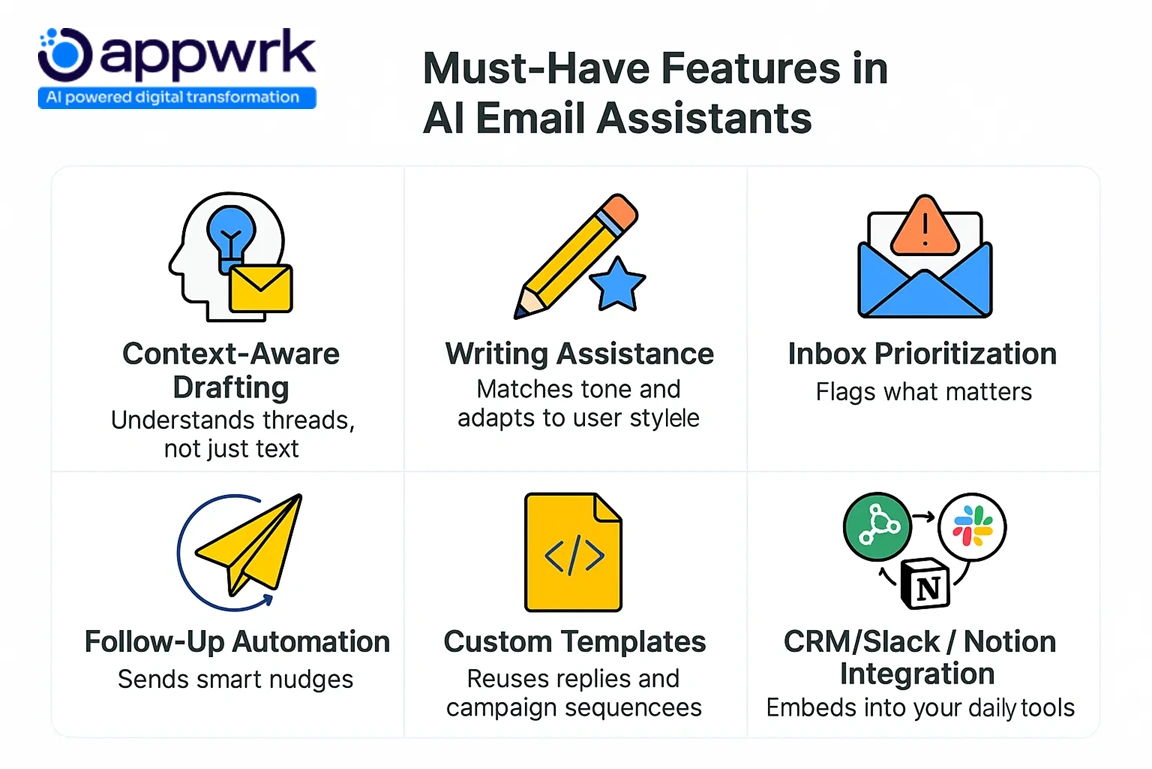
Choosing the best AI email assistant is not just about speed. The real value lies in how well it understands context, adapts to your writing style, and integrates with your existing tools. The strongest platforms combine AI automation, email prioritisation, and workflow intelligence to make inbox management effortless. This is what separates the best AI email assistants from simple writing bots.
Here’s what separates average AI tools from the best AI email assistants in 2025.
1. Context-Aware Drafting
The best AI email assistant platforms don’t just reply automatically, they understand conversation threads, sentiment, and tone before crafting a response. This advanced AI email automation ensures your communication feels human and relevant.
What it does:
Reads entire email chains to draft relevant, human-like replies
Adapts tone and content based on past interactions or sales stage
Uses sentiment and intent analysis to refine messages
This capability ensures your AI-powered email responses feel personal, relevant, and aligned with your workflow.
2. Writing Assistance with Personalisation
These AI email productivity tools go beyond generic drafts. They learn your tone, suggest edits, and generate messages that reflect your writing style, turning every email into a natural conversation.
These assistants blend generative AI features with personalisation so your emails sound natural, not robotic.
3. Email Management and Prioritisation
Modern AI email management software combines sorting, reminders, and labelling into one interface. This not only saves time but also enhances inbox clarity and collaboration.
What it does:
Filters out low-priority or promotional emails
Highlights key threads, adds reminders, and suggests follow-ups
Supports automatic labelling and AI-powered inbox filtering
This feature helps you get to inbox zero faster by combining task management and email automation in one interface.
4. Customizable Templates and Canned Responses
Smart templates make these AI email assistant tools valuable for HR, support, and sales teams, providing reusable, context-rich email frameworks.
What it does:
Reuses branded templates for common workflows
Inserts dynamic data like name, company, or date automatically
Simplifies onboarding, customer service, and outreach sequences
Best use case: Customer support, HR, and sales teams using automated sequences and personalised auto-replies.
5. Seamless Integration with CRM and Collaboration Tools
The best AI email assistants today are built around connectivity. Whether syncing with Pipedrive, Slack, or Notion, these tools use AI-powered email workflows to automate repetitive communication tasks.
Integrates with Pipedrive, Slack, Notion, and Microsoft 365
Pulls lead data from CRM fields to personalise replies
Enables shared inboxes and cross-team collaboration
Best examples: Missive, SmartWriter, Notion Mail
When your Outlook AI email assistant or Gmail AI plugin connects to your CRM, your entire workflow becomes faster and more intelligent.
Can AI Email Assistants Help With Cold Outreach and Email Marketing?
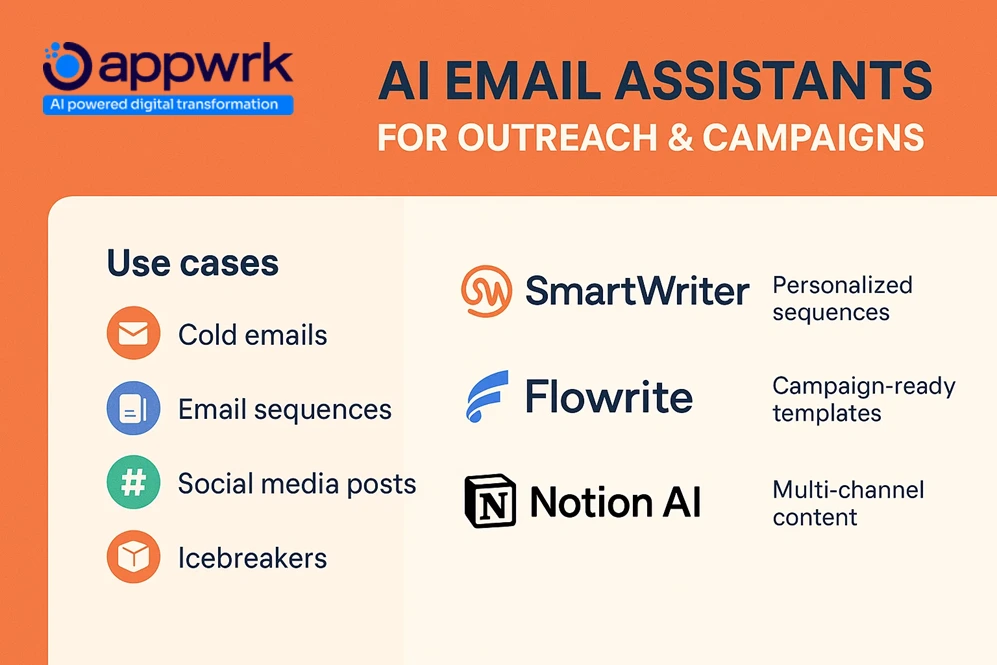
Absolutely. Modern AI email marketing tools are revolutionising outbound communication by automating everything from cold introductions to follow-up sequences. The best AI email assistant tools use AI email workflow automation to generate high-performing content tailored to each lead’s tone and stage in the sales funnel. Founders often shortlist the best AI email assistants based on tone accuracy, CRM sync, and automation rules.
With these AI-powered email automation systems, founders and marketers can easily scale personalised outreach without losing authenticity. Tools like MailMaestro, SmartWriter, Flowrite, and Notion AI help automate campaign writing, follow-ups, and social outreach.
You can expect features like:
Customizable templates for drip campaigns
Canned responses for fast client queries
Pre-built sequences for LinkedIn, Instagram, and email
Ready-to-go icebreakers for outbound leads
Founders launching SaaS tools or agencies scaling client content marketing often use these for generating social media posts, cold emails, or onboarding plans.
Tools like SmartWriter even use ChatGPT prompts under the hood to adapt to tone, business context, and prior user feedback, making your campaigns feel less automated and more authentic.
This makes AI email assistants a real game-changer for sales-led growth, where the ability to cut through inbox clutter marks the starting point of the conversion journey.
How AI Email Assistants Integrate With Your Workflow
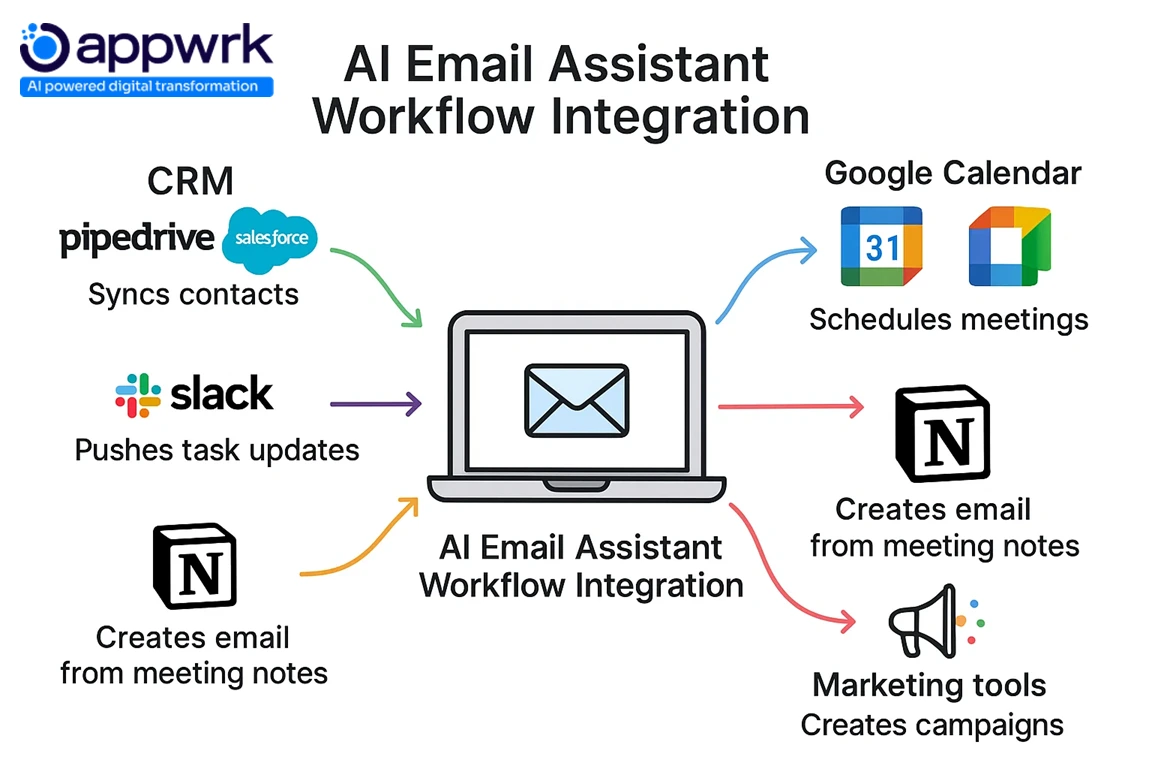
The best AI email assistant doesn’t just live in your inbox; it integrates across your entire digital ecosystem. Whether you use Gmail, Outlook, or collaborative tools like Notion and Slack, these assistants thrive when connected to your CRM, calendar, and communication apps.
1. CRM Systems (Pipedrive, HubSpot, Salesforce)
Auto-fills replies with contact details and pipeline information
Logs every email interaction automatically
Updates lead status based on communication flow
Best examples: SmartWriter and MailMaestro, known for their deep Pipedrive integration.
These features help teams streamline workflows and keep CRMs updated without manual effort.
These tools help teams create personalised outreach campaigns and automated sequences that feel tailored to every recipient.
5. How Do AI-Powered Email Assistants Improve Inbox Prioritization and Summarization?
An AI-powered email assistant doesn’t just send responses, but it helps you live a more productive digital life by automating tedious email management tasks like filtering, sorting, and prioritizing.
These tools use AI-generated content to create smart summaries of long email threads and suggestions for actions or replies based on your historical email patterns and business context. Think of them as AI scheduling assistants for your inbox.
Top tools with strong prioritization and summarization abilities include:
Shortwave: Bundles emails by topic and shows concise thread summaries.
Missive: Supports real-time team collaboration with comment threads and tagging.
SmartWriter: Reads context and creates full summaries and next-step replies using AI.
This eliminates the noise, saves time, and keeps your team focused on what really matters in your processes.
How Do AI Email Assistants Automate Follow-Ups Without Sounding Robotic?
Follow-ups can make or break communication, but automation often makes them sound impersonal. The best AI email assistants solve that by crafting messages that read like they came from you.
How it works:
Analyses past emails and identifies response gaps
Generates replies that match tone, intent, and relationship history
Personalises follow-ups with name, company, and prior conversation context.
These systems combine AI-powered email workflows and context-aware drafting to keep communication timely, relevant, and human.
What’s the Best Free AI Email Assistant With Inbox Filtering and Writing Tools?
Not every AI email assistant requires a paid plan. Some offer email prioritisation, and writing tools at no cost, helping founders, marketers, and remote teams improve email productivity without upfront investment.
Not every business needs an enterprise plan, there are plenty of free AI email assistant tools that help founders, marketers, and small teams improve communication efficiency without any cost. These AI email assistants for startups combine AI-powered inbox management and powerful AI automation to save time, reduce clutter, and personalise every message.
Here are the best free options to explore:
1. Compose AI
A Chrome-based AI email writing assistant that completes drafts automatically inside Gmail. Great for teams seeking a free AI productivity software solution for faster writing and auto-complete replies.
Offers tone control, writing templates, and smart snippets
Great for quick responses and personalised auto-replies
Free to use with an optional 14-day premium trial
Ideal if you want to write faster inside Gmail without switching tools.
2. Mailmeteor AI Writer
One of the best AI email workflow tools for Gmail, helping professionals generate cold emails and follow-ups using simple prompts. Ideal for small teams running outreach campaigns on a budget.
Focused on speed, simplicity, and AI-powered email workflows
Best for outreach, follow-ups, and cold campaigns
Integrates smoothly with Gmail and Google Workspace
Perfect for solo professionals or small teams that need reliable, no-frills writing help.
3. SaneBox (Free Trial)
SaneBox offers a 14-day free trial with advanced AI-powered inbox filtering. Offers advanced AI-powered inbox management with smart filtering, snooze, and follow-up reminders. A great starting point for professionals testing AI email assistant software before upgrading.
Automatically separates important messages from clutter.
Includes snooze, reminders, and follow-up features
Works with Gmail, Outlook, and Apple Mail
A solid option for testing inbox management without committing to a new platform.
Best For:
Founders managing customer queries and outreach
Teams testing AI email assistants for time savings
Writers and marketers scaling email campaigns affordably.y
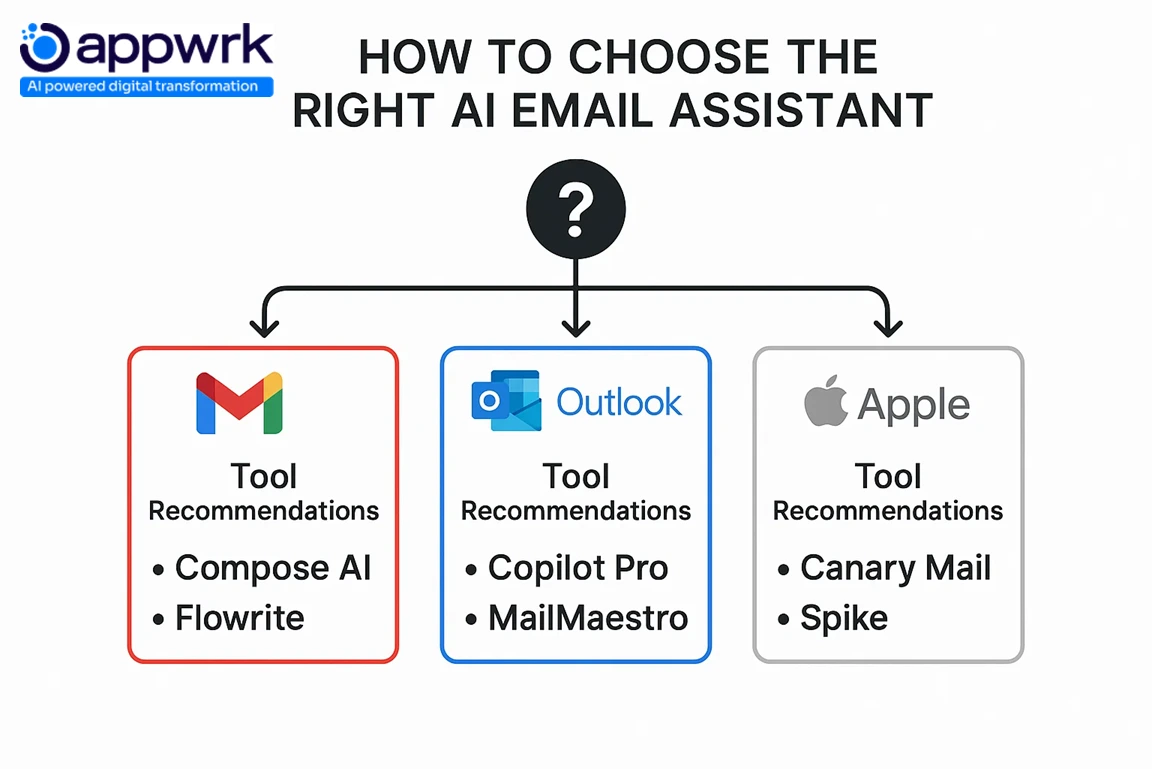
How to Choose the Right AI Email Assistant Based on Your Email Provider
AI email assistants perform differently depending on where they’re deployed. Gmail, Outlook, and Apple Mail each support different levels of automation, integration, and AI-powered email workflows.
Here’s how to match your tool to your provider:
If You Use Gmail
Go with:Flowrite, Compose AI, SmartWriter, Shortwave, Notion Mail Why: They leverage Gmail’s native APIs and Chrome extensions for direct thread access, context-aware drafting, and email summarisation.
If You Use Microsoft Outlook
Go with: Microsoft Copilot Pro, MailMaestro, Missive, Canary Mail Why: Outlook-focused tools offer deep Microsoft 365 integration, task management, calendar sync, and SOC 2-compliant data workflows.
If You Use Apple Mail
Go with: Canary Mail, Spike Why: Built for privacy and encrypted AI workflows, these tools offer HIPAA-compliant experiences optimised for macOS users.
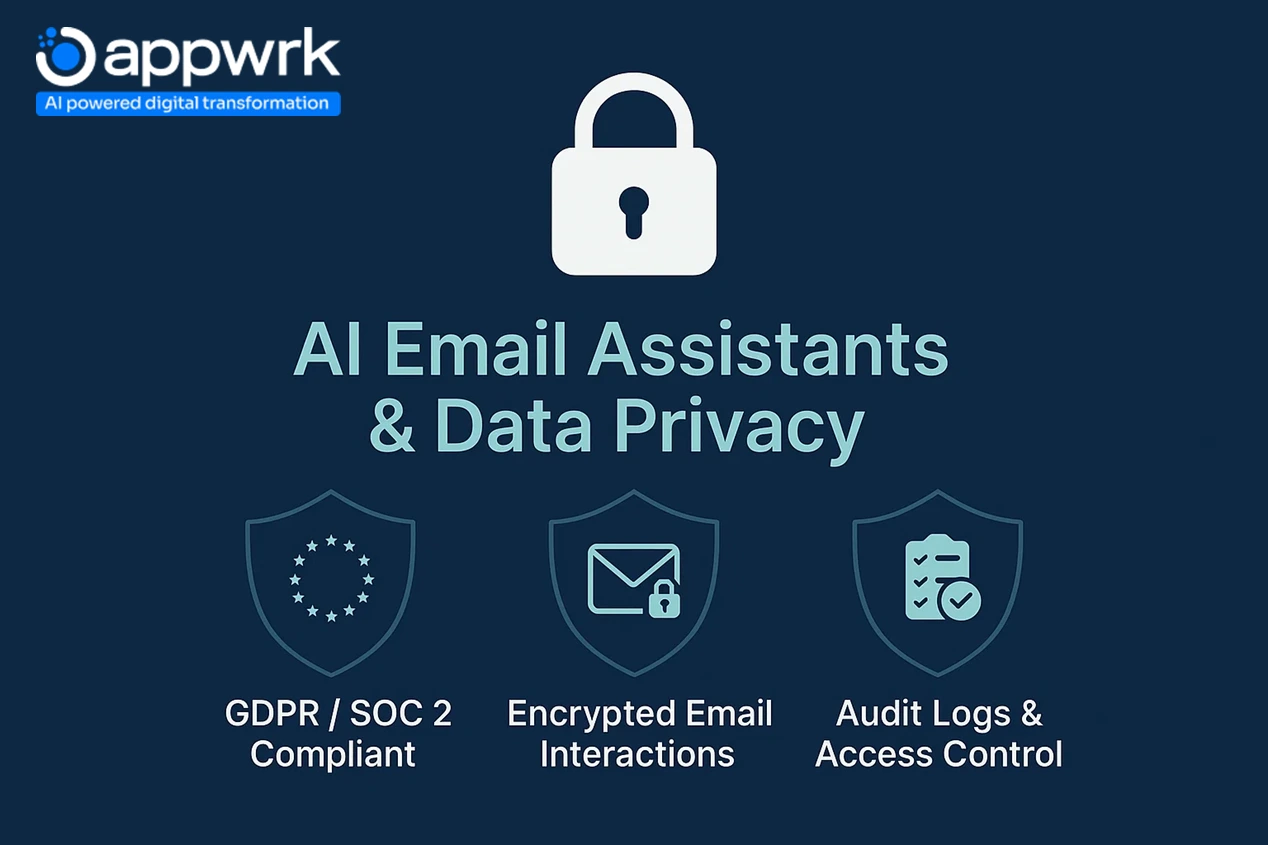
AI Email Assistants and Data Privacy: What You Must Know
As AI email automation software becomes central to business communication and support workflows, data privacy and enterprise compliance have become non-negotiable. Every AI email assistant for enterprise, from Gmail plugins to Outlook integrations, must comply with strict global security frameworks.
1. GDPR and SOC 2 Compliance The best GDPR-compliant AI email tools ensure all message data, attachments, and logs are processed securely. These platforms protect sensitive communication while maintaining the speed and intelligence of AI email assistant.
2. Encryption and Access Control Reliable AI email management software applies end-to-end encryption, access permissions, and audit trails, ensuring every message generated by your enterprise AI email assistant remains confidential and traceable.
3. Audit Logs and Traceability Reliable assistants maintain complete audit trails for every AI-generated response and CRM update. This transparency helps teams meet compliance audits, track and automate email responses, and ensure accountability across departments.
4. Secure Integrations The top AI email automation tools use OAuth 2.0 authorisation for Gmail, Microsoft 365, Slack, and CRMs, minimising third-party exposure and ensuring enterprise-grade protection.
Tools That Prioritise Security and Accuracy
Platforms such as Appwrk’s AI Email Responder, Canary Mail, and Microsoft Copilot Pro exemplify GDPR-compliant AI email tools. They combine context-aware drafting, sentiment analysis, and compliance-ready infrastructure to balance automation with trust.
These safeguards make them ideal for organisations that depend on AI email automation software but cannot compromise on compliance, confidentiality, or user control.
Enterprise-ready security across cloud and on-premise systems
These safeguards make them ideal for organisations that depend on AI email automation but cannot compromise on compliance, confidentiality, or user trust.
Which AI Email Assistant Is Best Rated on Reddit and Founder Communities?
Real-world users on Reddit, Product Hunt, and startup forums often share more practical insights than traditional reviews. Here are the most frequently recommended AI email assistants across founder communities.
Missive
Highly rated for team collaboration and shared inbox management
Trusted by support teams and agencies needing internal chat and accountability
Flowrite
Popular among growth marketers and solo founders
Praised for tone-matching, clear writing, and automated sequences
Compose AI
Frequently mentioned for Gmail integration and simplicity.
Known as a “low learning curve, high output” tool for everyday writing
Why Founders Prefer These Tools
Fast setup with minimal onboarding
Noticeable gains in writing speed and email automation
Easy integration with Slack, Notion, and CRM platforms like Pipedrive
How Much Does It Cost to Build an AI Email Assistant?
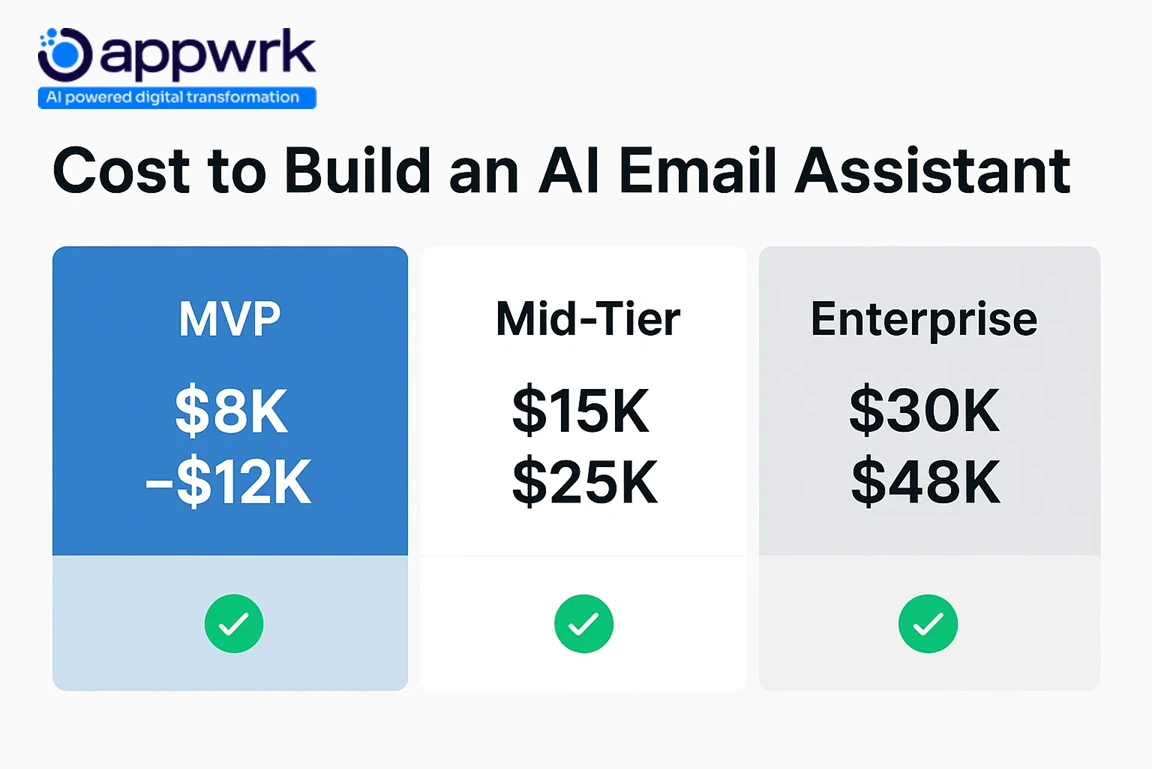
Building a custom AI email assistant software gives teams full control over integrations, tone, and compliance. Development costs typically range between $8,000 and $48,000+, depending on the project’s scale and complexity.
Cost Ranges by Scope
$8,000 to $12,000: Basic MVP with automated reply generation, Gmail or Outlook integration, and simple inbox parsing.
$15,000 to $25,000: Mid-tier build with CRM sync, dashboards, and Gmail, Outlook, Slack integrations.
$30,000 to $48,000+: Enterprise-ready systems with advanced NLP, SOC 2 or GDPR compliance, and scalable infrastructure.
Core AI reply engine built using OpenAI or custom ChatGPT prompts
Inbox connectivity (Gmail, Outlook, Google Workspace APIs)
Add-ons for team collaboration and CRM sync
Data security, encryption, and audit systems
Model tuning and sentiment analysis for tone accuracy
Pro Tip: A phased rollout works best. Start lean with essential features, validate real use cases, and scale gradually. Outsourcing development to expert teams in India or Eastern Europe can reduce total build cost by up to 60%.
Future Outlook: What’s Next for AI Email Assistants in Marketing, Sales, and Customer Service
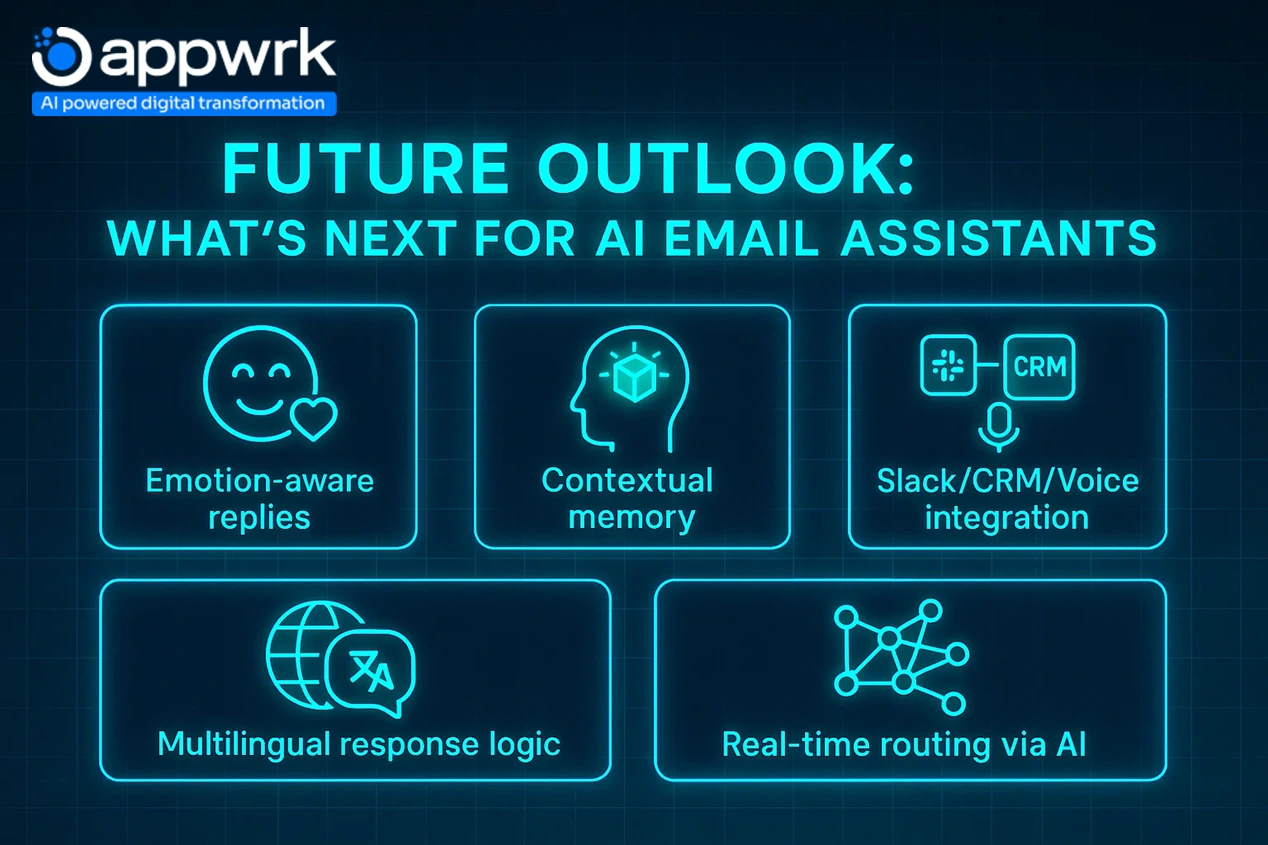
The next generation of AI email assistants won’t just reply to messages; they’ll act as intelligent co-workers, handling communication, context, and coordination across tools and teams. In marketing, sales, and support, AI-powered email systems are quickly evolving from reactive drafting engines into proactive workflow partners.
1. Emotion-Aware Replies Future assistants will analyse tone, urgency, and sentiment to adjust responses in real time, offering empathetic, context-aware drafting that protects customer trust.
2. Contextual Memory Across Threads Persistent memory will allow AI writing assistants to remember prior conversations, deals, or customer preferences, ensuring continuity across personalised auto-replies and automated sequences.
3. Unified Integration With CRM, Voice, and Collaboration Tools Expect tighter links between Gmail, Outlook, Slack integrations, CRMs, and voice assistants. Email, chat, and call data will merge into a single, searchable communication thread.
4. Multilingual Response Logic Global teams will benefit from assistants that automatically detect and generate replies in multiple languages, ideal for customer service, international sales, and remote support teams.
5. AI-Powered Real-Time Routing Advanced AI task managers will triage and delegate incoming messages based on content, urgency, or workflow context, sending each email to the right person or department instantly.
With constant innovation, the best AI email assistants of the future will act as proactive collaborators, handling communication, context, and coordination autonomously.
How Appwrk Can Help in AI Email Assistant Development
At Appwrk, we help businesses turn inbox clutter into intelligent, context-aware communication. Our AI email assistant software, built using OpenAI, Laravel, Gmail API, and SQL, enables real-time, personalised, and human-like responses that adapt to tone, thread, and intent.
Fast MVP cycles: Launch a working prototype in weeks, validate performance, and scale without unnecessary overhead.
End-to-end development: From prompt engineering and NLP tuning to dashboard design, model optimisation, and compliance setup.
Integration-ready: Seamless connections with Gmail, Outlook, Slack, Notion, and CRMs like Pipedrive and HubSpot.
Continuous support: Model updates, token optimisation, automating email responses, and feature scaling over time.
Whether you want to build something like Notion Mail or a fully custom AI email assistant tailored to your business, Appwrk ensures a faster go-to-market, long-term scalability, and measurable ROI.
Founder’s Guide: Choosing the Right AI Email Assistant for Your Business
If you’re evaluating AI email assistants for your company, the decision often comes down to your use case, team workflow, and long-term cost strategy. Here’s how most founders approach it.
1. Start With a Clear Use Case
Define what you’re solving first: cold outreach, customer support replies, or inbox overload. Choose tools that align with that goal instead of paying for features you’ll never use.
2. Match It to Your Existing Stack
If you use Gmail:Flowrite, Compose AI, or Shortwave, they integrate best.
If you use Outlook, go for Microsoft Copilot Pro or MailMaestro for deeper task management and calendar sync.
If you use Slack or Notion,Missive and Notion Mail deliver cross-platform visibility.
3. Validate Before You Scale
Start small with a 14-day free trial or build a lean MVP. Track speed, tone accuracy, AI automation, and integration quality before expanding.
4. Prioritise Human-Like Tone
Pick an AI writing assistant that mimics your tone and understands context-aware drafting. Tools that sound robotic can harm credibility and customer trust.
The right AI tool doesn’t just have advanced features; it fits your workflow naturally and scales with your team’s habits. Choosing among the best AI email assistants comes down to workflow fit, tone control, and security requirements.
FAQs
What is the best AI email assistant for writing and responding to emails? Flowrite, Compose AI, and SmartWriter rank among the best AI email assistants for writing and replies. They generate context-aware, human-like drafts from short prompts while keeping your tone intact.
How does an AI email assistant improve inbox management and productivity? These tools reduce clutter, apply automatic labelling, and suggest follow-ups, helping teams get to inbox zero faster. SaneBox, Shortwave, and Missive lead in AI-powered inbox filtering and response tracking.
Can AI email assistants automate follow-ups and reminders without sounding robotic? Yes. SmartWriter and Compose AI use sentiment and intent analysis to craft follow-ups that feel natural, adjusting timing and phrasing based on prior interactions.
Are there free AI email assistant tools that include writing assistance and templates? Yes. Compose AI, Mailmeteor, and SaneBox offer free or trial versions with writing templates and snippets, ideal for startups or individual users.
Which AI email assistant integrates best with Gmail, Outlook, and Slack?
Each supports Gmail, Outlook, and Slack integrations for streamlined workflows and collaboration.
How much does it cost to build a custom AI email assistant for a business? Expect $8,000 to $48,000+ based on features, NLP tuning, and integrations. Outsourcing to experienced developers like Appwrk can lower costs while maintaining quality and speed to deployment.
What are the best AI email assistants?
The best AI email assistants in 2025 include Appwrk AI Email Responder, Flowrite, Superhuman, Gemini, and Missive, tools that combine writing assistance, inbox automation, and CRM integration
What features should a founder look for when choosing an AI email assistant tool? Key features include:
Is it better to buy an off-the-shelf AI email assistant or build a custom one? Buy ready-made tools if you want immediate results or testing flexibility. Build custom if you need ownership, brand tone control, and enterprise-grade security.
How do AI email assistants compare in founder reviews on Reddit and Product Hunt? Reddit users favour Missive for team workflows, Flowrite for personalised auto-replies, and Compose AI for ease of use. Founders value tools that integrate quickly and genuinely save time.
What are the future trends for AI email assistants in marketing, support, and operations? Expect deeper CRM synchronisation, real-time email summarisation, and smarter tone modelling. AI assistants will also connect seamlessly with Notion, LinkedIn, and Microsoft Copilot Pro for AI-powered email search, automated sequences, and natural task scheduling across platforms.
Gourav Khanna is the Co-founder and CEO of APPWRK, leading the company’s vision to deliver AI-first, scalable digital solutions for enterprises and high-growth startups. With over 16 years of leadership in technology, he is known for driving digital transformation strategies that connect business ambition with outcome-focused execution across healthcare, retail, logistics, and enterprise operations.
Recognized as a strategic industry voice, Gourav brings deep expertise in product strategy, AI adoption, and platform engineering. Through his insights, he helps decision-makers prioritize market traction, operational efficiency, and long-term ROI while building resilient, user-centric digital systems.
Subscribe to APPWRK Blogs, We'll Do the Rest!
Get Blogs on UI/UX, Mobile Apps, Online Marketing, and Web development technology.
Unlock worthy and priceless suggestions from the masters of mobile and web app development