150+ minds across 4 countries. Join a culture of innovation, ownership & growth.
Rewire for AI
From machine learning to deep learning, from classification tools to overall process automation – our AI engineers will help you retool your existing system or enhance your company results.
Ship faster, scale smarter, built for product companies and SaaS teams
Our Latest Work
We strive hard to deliver result-driven digital solutions across the globe. Check out our case studies to get a glimpse of how we ideate, innovate, and create unconventional digital solutions according to the requirements of our clients.
Discover diverse and passionate insights from our tech enthusiasts. We collaborate across various sectors to streamline operations and drive innovation. Explore our rapidly growing collection of articles to see why we’re at the forefront of IT solutions.
The decision to move from Magento to Shopify is one of the most significant replatforming choices an ecommerce business can make. Magento is powerful, but its power comes with...
Accuracy gap is real: Traditional CPG forecasting carries a 25-40% MAPE error rate. AI-powered models bring that down to 8-15%, according to McKinsey research....
Real stories from global leaders who trusted us with their ideas.
Partnering with APPWRK helped us build a compliant and scalable healthcare platform, accelerating our time-to-market by 35%. Their team consistently delivered outstanding work.
Beesers
Digital Healthcare Client
Collaborating with APPWRK, Sportskeeda modernized its platform into a real-time sports engagement ecosystem, enabling seamless content delivery, scalable fan interactions, and high-velocity performance.
Sportskeeda
Sports & Entertainment Partner
Working with APPWRK was effortless. They captured our vision, maintained full compliance, and delivered a digital experience that built trust and elevated how customers interact with our fintech brand.
PayPenny
Fintech Partner
Working with APPWRK gave us confidence in adopting AI responsibly. Their team built a safe, intelligent bot that transformed how we engage with leads and helped us achieve measurable revenue growth.
IFB
AI Transformation Partner
Leveraging APPWRK’s digital expertise, Nemesis launched a scalable, compliant, and safe super app that connects content delivery, real-time communication, and logistics management within a single platform.
Gartner projects that by 2026, 50% of workplace communications will be AI-augmented.
Using pre-trained OpenAI models or downloadable AI models with APIs helps minimise upfront investment and avoid hidden integration fees.
A typical SaaS build with smart replies, CRM sync, and thread summarisation can be completed in 6 to 10 weeks.
Factor in hidden costs like token usage, Cloud Infrastructure & Compute Power, Data Annotation & Labelling, and Compliance & Legal Requirements (SOC 2, GDPR).
The smartest approach: roll out in phases, launch your MVP first, then expand with features like AI-powered inbox filtering, email prioritisation, and human-in-the-loop approvals for sensitive drafts.
Why Are Businesses Building AI Email Assistants Now?
Businesses are moving fast toward AI email automation because inboxes have become productivity bottlenecks. According to McKinsey, professionals spend 28% of their week managing emails, a clear signal that automation isn’t a luxury anymore; it’s ROI waiting to be unlocked.
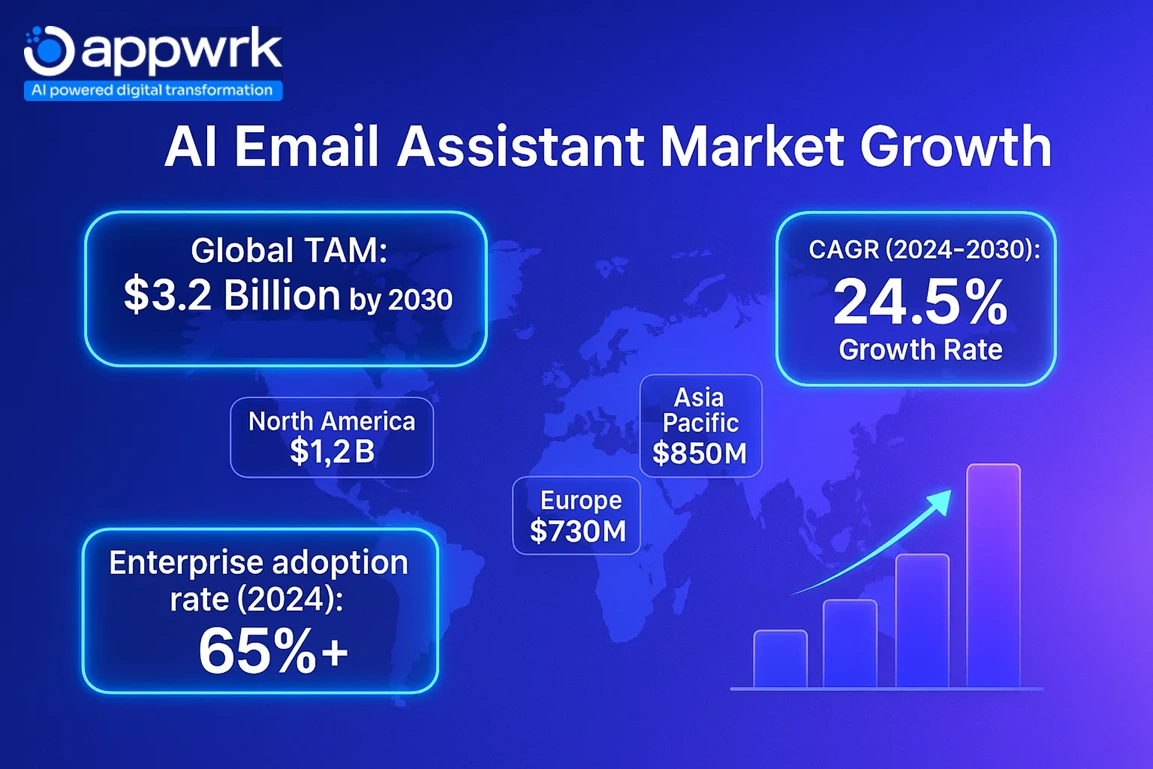
The AI-powered Email Assistant Market is projected to reach a valuation of approximately USD 1,910.2 million by 2033, up from USD 750 million in 2023. This growth is anticipated to occur at a compound annual growth rate (CAGR) of 9.8% over the forecast period from 2024 to 2033.
Platforms like Flowrite, Superhuman, and Copilot Pro have set the benchmark for what’s possible: instant replies, smart triage, and tone-matched communication. But more teams are now choosing to build custom AI email Assistants for one key reason: ownership.
Full control over data privacy and security standards.
Custom workflows for sales, customer service, or leadership inboxes.
Integration flexibility across CRMs, chat platforms, and analytics tools.
This guide explores both worlds: the best AI email assistants in 2025 and how to build your own without overspending.
How Much Does It Cost to Build an AI Email Assistant?
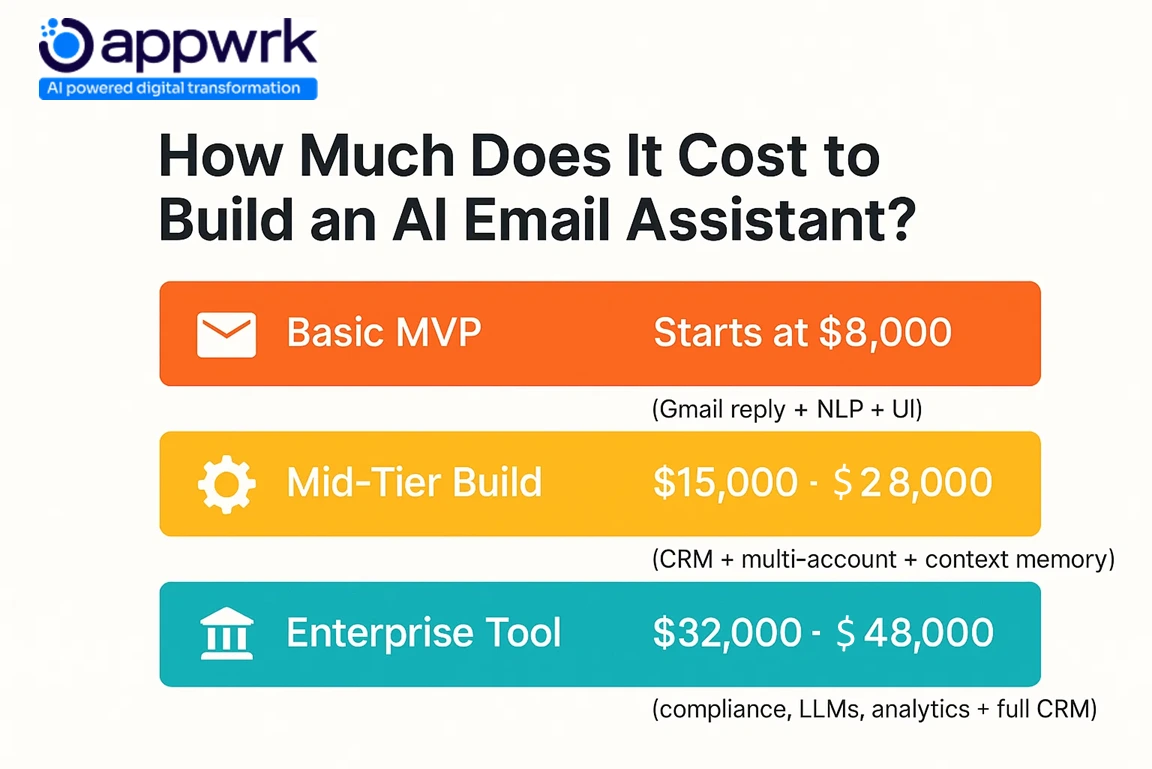
Building an AI-powered email assistant can start at $8,000 and scale to $48,000+, depending on your tech stack, integrations, and Natural Language Processing depth.
Here’s how budgets typically break down:
$8,000 to $12,000: MVP builds with core features like auto-reply generation, email parsing, and basic Gmail integration.
$15,000 to $25,000: Mid-tier builds with UX dashboards, CRM integrations, multi-user access, and Notion Mail or Slack add-ons.
$30,000 to $48,000: Enterprise-grade builds featuring advanced NLP, Microsoft 365 compatibility, custom AI model tuning, and data compliance for SOC 2 or GDPR.
For startups launching tools like Notion AI, Microsoft Copilot Pro, or an AI Chatbot Personal Assistant, the smartest approach is to roll out in phases, start lean, validate with real users, then scale features like AI-powered inbox filtering, email prioritisation, and smart scheduling assistants.
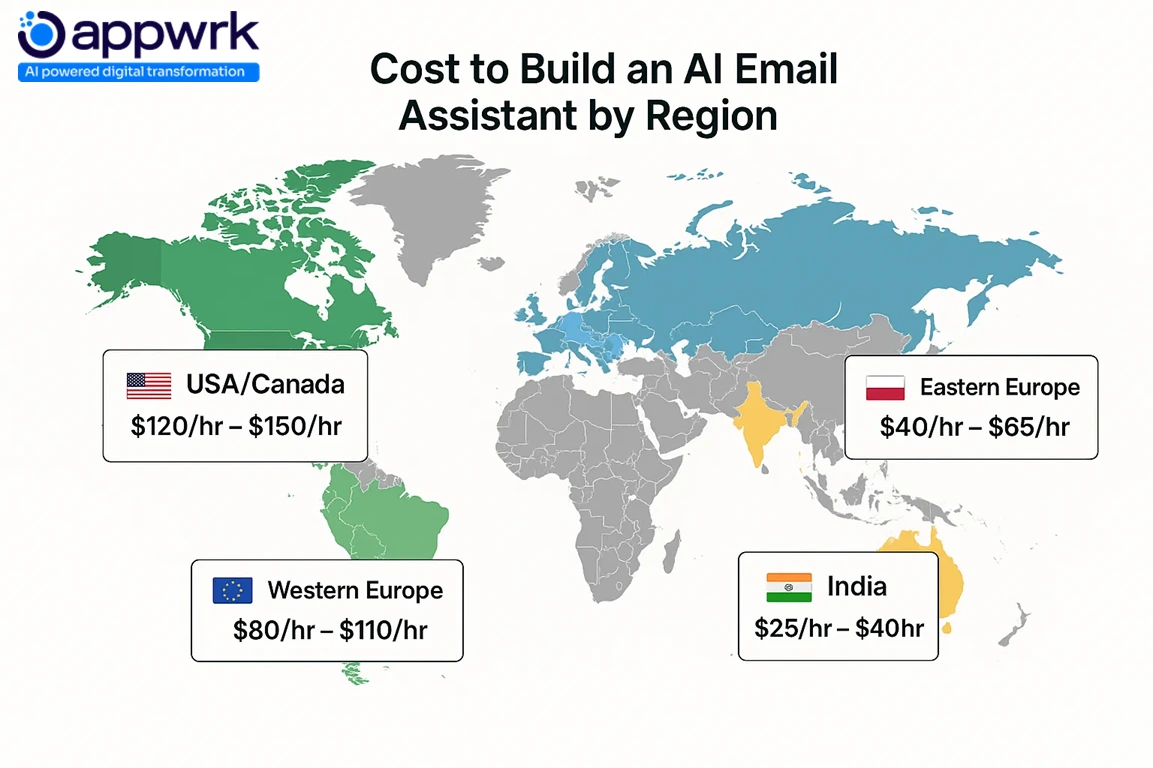
When you outsource instead of going fully in-house, you can cut costs significantly, especially with experienced teams in India or Eastern Europe charging $18 to $35/hour, compared to $40 to $60/hour in the US or UK.
Feature Layer of the AI-powered email assistant
MVP Build Cost Estimate of the AI-powered email assistant
Full Feature Development Cost of the AI-powered email assistant
Inclusions in the AI email Assistant
Core Reply Generator Logic
$2,000 to $3,500
$4,000 to $8,000
Based on OpenAI models, Claude, or custom ChatGPT prompts
Seamless Integration with Gmail / Outlook
$1,200 to $2,000
$3,000 to $6,000
Connects inboxes for parsing, routing, and auto-replies
Includes role-based access and inbox preview controls
Notion Mail / Slack Add-ons
$500 to $1,000
$2,000 to $3,500
Deep integration with Google Workspace users and Apple users
LLM Tuning + Testing
$1,000 to $2,500
$3,000 to $6,000
Covers Data Annotation & Labelling, prompt tuning, and fine-tuning
Data Handling & Privacy Layer
$700 to $1,200
$2,000 to $3,000
Enables audit logs, encryption, and Compliance & Legal Requirements
Ongoing Maintenance
$200/month
$500 to $1,000/month
Token optimization, API renewals, and performance testing
Formula:
Total Cost = Development Hours × Hourly Rate + Data + Integrations + Testing + Maintenance
Outsourcing teams with experience in Cloud Infrastructure & Compute Power, Zero-knowledge cloud generation, and AI-powered inbox filtering help minimise upfront investment while delivering scalable infrastructure.
Which Features Drive the Cost to Build an AI Email Assistant?
Essential MVP Features
AI Reply Assistants – Generate first-draft responses that match tone and brand voice.
AI Sorting Assistants – Classify and prioritise inbound messages.
AI Dispatching Assistants – Route or auto-assign emails to the right teammate.
Thread Summarisation – Condense long threads into quick digests.
Smart Scheduling – Suggest times or book meetings via deep integration with Google Calendar.
Token-Based Access – Manage usage by pricing tier or subscription level.
Advanced Features
Run sentiment and intent analysis to detect urgency.
Generate a set of tags for smarter categorisation.
Extract entities (like order numbers or deadlines) to trigger automated actions.
Human-in-the-loop approvals for sensitive drafts.
Downloadable AI model for on-device or private cloud use.
These features help teams hit inbox zero, reduce context switches and keystrokes, and deploy a fast payback model for ROI.
What Are the Key Factors That Influence AI Email Assistant Development Cost?
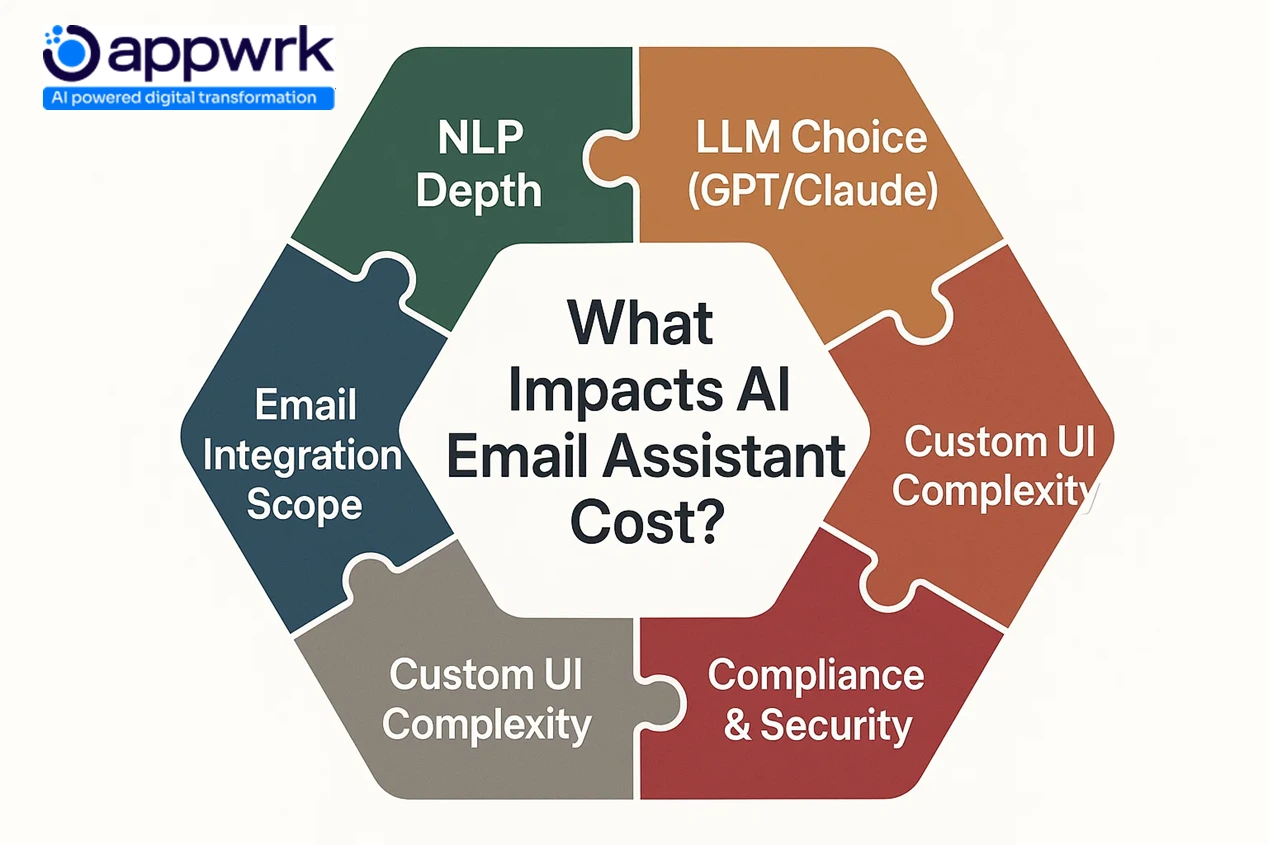
The cost to build an AI email assistant depends on far more than code. It’s shaped by your technology choices, data quality, and how your team structures the build. Here are the major cost drivers influencing every AI email responder project:
Developer Rates
Hourly rates vary widely by region. You’ll save significantly by working with offshore AI teams, typically $18 to $35/hour in India or Eastern Europe, compared to $40 to $60/hour in the US or UK. The same build can cost half as much without compromising quality.
Type of AI
Choosing between rule-based automation, LLM-driven assistants, or AI Chatbot Personal Assistants defines your complexity and training needs. Generative OpenAI models or downloadable AI models are faster to implement, while fully custom NLP systems require more compute and fine-tuning time.
Features like tone matching, email prioritisation, or seamless integration with Gmail and Outlook demand additional logic, workflow design, and QA testing. More complexity equals more Development Hours × Hourly Rate + Data + Integrations + Testing + Maintenance.
Data Type and Dataset Size
Your AI’s accuracy depends on the data it learns from. Larger datasets increase Cloud Infrastructure & Compute Power needs, storage costs, and fine-tuning hours, especially if your system runs sentiment and intent analysis or extracts entities like names, order numbers, or deadlines.
Data Collection and Preparation
Formatting and preprocessing your datasets, whether customer support emails or CRM threads, takes time and engineering effort. Using pre-built frameworks and APIs can cut this cost significantly.
Data Annotation & Labelling
Manually tagging data for tone, urgency, and intent is essential to improve model performance, but it adds to the budget. Outsourcing this step helps minimise upfront investment.
Data Security and Privacy
Compliance with GDPR, SOC 2, and HIPAA introduces additional infrastructure costs, encryption layers, audit logs, and restricted user access. These are mandatory for enterprise-grade builds handling sensitive data.
Algorithm Accuracy and Fluency
Models tuned to match tone and brand voice or provide human-in-the-loop approvals require continuous tuning. Higher fluency demands more compute cycles and iterative testing, especially for AI Reply Assistants designed to generate first-draft responses.
Real-Time Performance
If your goal is instant responses (under two seconds), expect higher costs for caching, load balancing, and GPU-backed inference. This is common in AI Dispatching/Routing Assistants that triage and classify emails automatically.
Continuous Learning and Improvement
Systems that adapt with each new email, like Notion AI or ChatGPT plugins, need retraining pipelines, adding maintenance and DevOps overhead.
Infrastructure and Tools
Cloud usage, database scaling, and performance optimisation on Azure, AWS, or GCP are long-term expenses. Choosing the right architecture early prevents hidden integration fees and scope creep later.
These factors explain why two AI assistants with similar features can vary by thousands of dollars; it’s not just what you build, but how efficiently you build it.
How Much Does It Cost to Build AI Email Assistants in Different Regions?
India: Ideal for Affordable AI Email Assistant Development
India remains the go-to destination for startups building custom AI Virtual Assistants and email response generators on a budget. Development costs range from $8,000 to $15,000 for a complete MVP, with hourly rates between $18 and $30. Teams here offer strong expertise in OpenAI models, inbox automation, and AI-powered inbox filtering, all at globally competitive prices.
Eastern Europe: Balanced Cost and Engineering Quality
Building an AI email Assistants in countries like Ukraine or Poland delivers solid product quality at a moderate cost. Expect MVP builds to fall between $10,000 and $20,000, with rates typically around $25 to $40 per hour. This region is ideal for mid-tier startups that want AI sorting assistants, dispatch automation, and tone-accurate email generation.
United States: Best for Enterprise-Grade AI Email Assistant Projects
For advanced AI Chatbot Personal Assistants or enterprise-grade email automation with deep Gmail and Outlook integration, US-based teams offer premium service and compliance alignment. Projects usually start around $25,000 and can scale higher depending on NLP depth and integrations. Hourly rates range from $45 to $60, reflecting specialised experience in security, scalability, and data compliance.
Latin America: Mid-Tier Builds at Competitive Rates
Countries across Latin America are becoming emerging hubs for AI email assistant development, offering a balance of affordability and reliability. Typical project costs range between $12,000 and $18,000, with hourly rates from $20 to $35. It’s a strong choice for startups wanting to minimise upfront investment while maintaining quality engineering.
What Does an AI Email Assistant Actually Do for Gmail and Outlook Users?
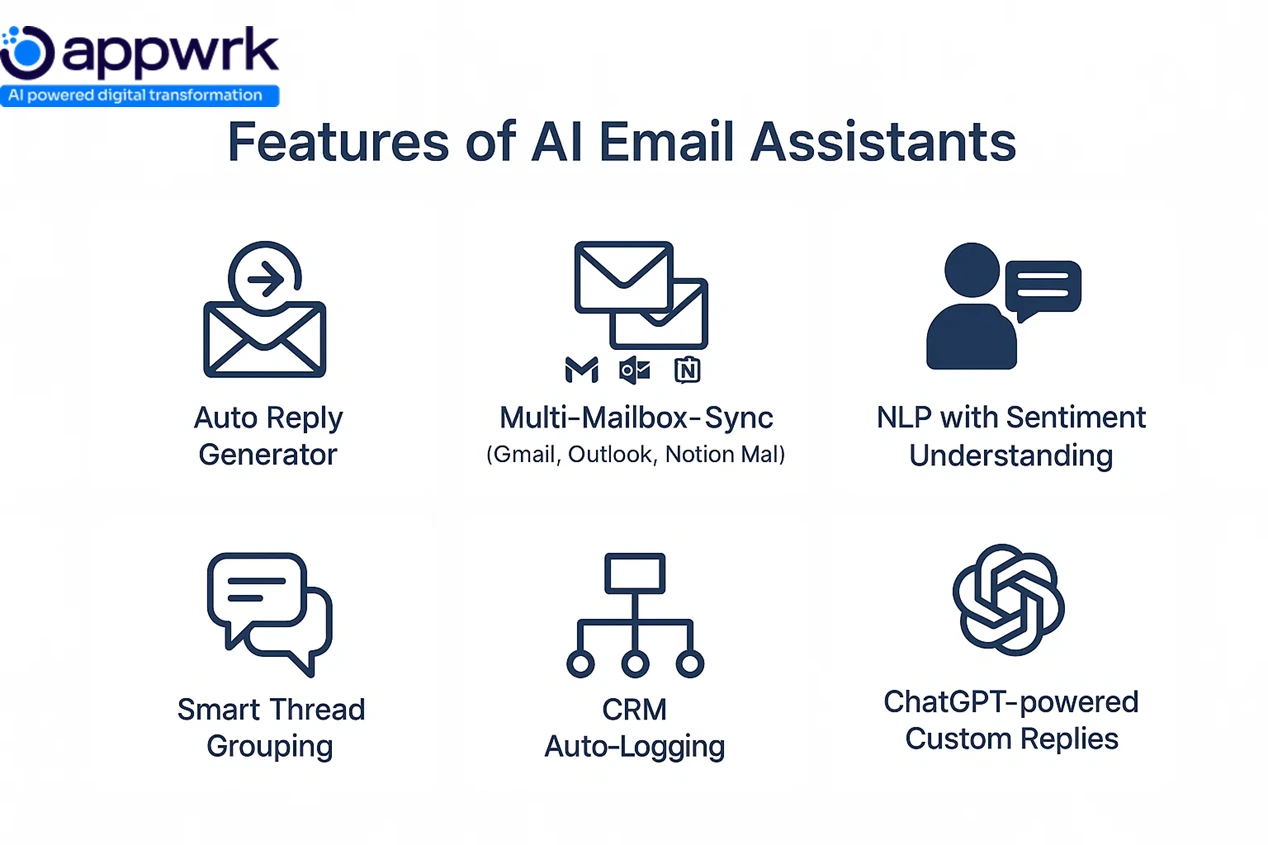
An AI email assistant automates how users read, write, and manage emails in Gmail, Outlook, and connected platforms. It acts as an intelligent layer that filters, drafts, and prioritises your inbox, bringing you closer to true inbox zero.
Here’s how it works in practice:
Generates first-draft responses using OpenAI models like GPT-4 or Gemini
Condenses long threads into a digest for quick catch-up
Runs sentiment and intent analysis to detect tone, urgency, or escalation needs
Classifies and sorts inbound messages, labelling by importance or category
Extracts entities (names, dates, order numbers) for faster routing and action
Seamlessly integrates with Gmail, Outlook, and Google Workspace.
Suggests tone, phrasing, or structure to match your brand voice
Whether you’re using a lightweight AI Reply Assistant or a custom AI Virtual Assistant, the goal is the same: fewer context switches, faster actions, and replies that sound human, not robotic.
Top Use Cases for AI Email Assistants: What Leading Brands Already Do
AI email assistants are now embedded across industries, from sales and HR to legal, healthcare, and SaaS. Below are key real-world examples showing how AI Sorting Assistants, AI Dispatching Assistants, and AI Reply Generators are already reshaping communication.
1. Customer Service Automation
Use Case: Auto-respond to FAQs, refund requests, and ticket updates. Example: Amazon uses AI responders to confirm order issues and route returns. Features Used: Auto-reply generation, triage and classification, CRM sync. Unique Insight: Every automated response improves customer satisfaction by reducing queue times.
The Marketing & Communication domain emerged as the top use case in 2023, accounting for 37.5% of all AI email assistant usage, reflecting high-volume outreach and follow-up demands.
2. Sales and Lead Nurturing
Use Case: Handle first-contact replies, qualification emails, and follow-ups. Example: HubSpot’s CRM uses AI to personalise outreach and schedule meetings. Features Used: AI scheduling assistants, intent detection, tone-matched templates. Unique Insight: AI replies keep your sales pipeline on autopilot, boosting conversion without manual follow-up.
3. Recruiting and HR Automation
Use Case: Auto-reply to applicants, confirm interviews, and schedule calls. Example: Lever integrates AI responders for candidate communication. Features Used: Chatbot workflow customisation, calendar sync, and sentiment analysis. Unique Insight: Teams save hours weekly by automating repetitive, low-value exchanges.
4. Executive Inbox Management
Use Case: Summarise threads, draft responses, and redirect messages to teams. Example: Superhuman uses AI to optimise inbox usage and generate smart drafts. Features Used: Thread summarisation, prioritisation, and smart tagging. Unique Insight: Keeps leaders focused, not buried under 200 daily messages.
5. Legal and Compliance
Use Case: Auto-acknowledge contract updates, flag due dates, and escalate risks. Example: Ironclad leverages NLP for AI clause summarisation and legal routing. Features Used: Secure routing, workflow management, and audit logs. Unique Insight: Prevents missed deadlines while ensuring Compliance & Legal Requirements are met.
6. Healthcare and Appointment Handling
Use Case: Confirm bookings, handle patient FAQs, send reminders. Example: Zocdoc’s AI responders manage appointment scheduling and escalations. Features Used: HIPAA-compliant routing, tone moderation, zero-knowledge cloud generation. Unique Insight: Privacy-centric design builds trust, critical in patient communication.
Use Case: Guide users through setup, share tutorials, and trigger support workflows. Example: Notion’s AI assistant auto-replies to onboarding queries and suggests resources. Features Used: Smart reply generation, Auto Label, and multi-channel sync. Unique Insight: Early automation reduces churn and improves first-week engagement.
Free vs Custom AI Email Assistant: What’s the Real Budget Trade-Off?
Free AI tools like Superhuman, Flowrite, or Notion AI are quick to adopt but come with clear limits, no data ownership, limited training, and capped API usage.
Free AI Email Assistants:
Depend on external APIs like ChatGPT or Microsoft 365 Copilot
The result? Custom AI Virtual Assistants deliver higher ROI, long-term scalability, and fast payback, transforming email from a manual chore into a true ROI engine.
Top AI Email Assistants by Category: Which One Fits Your Use Case?
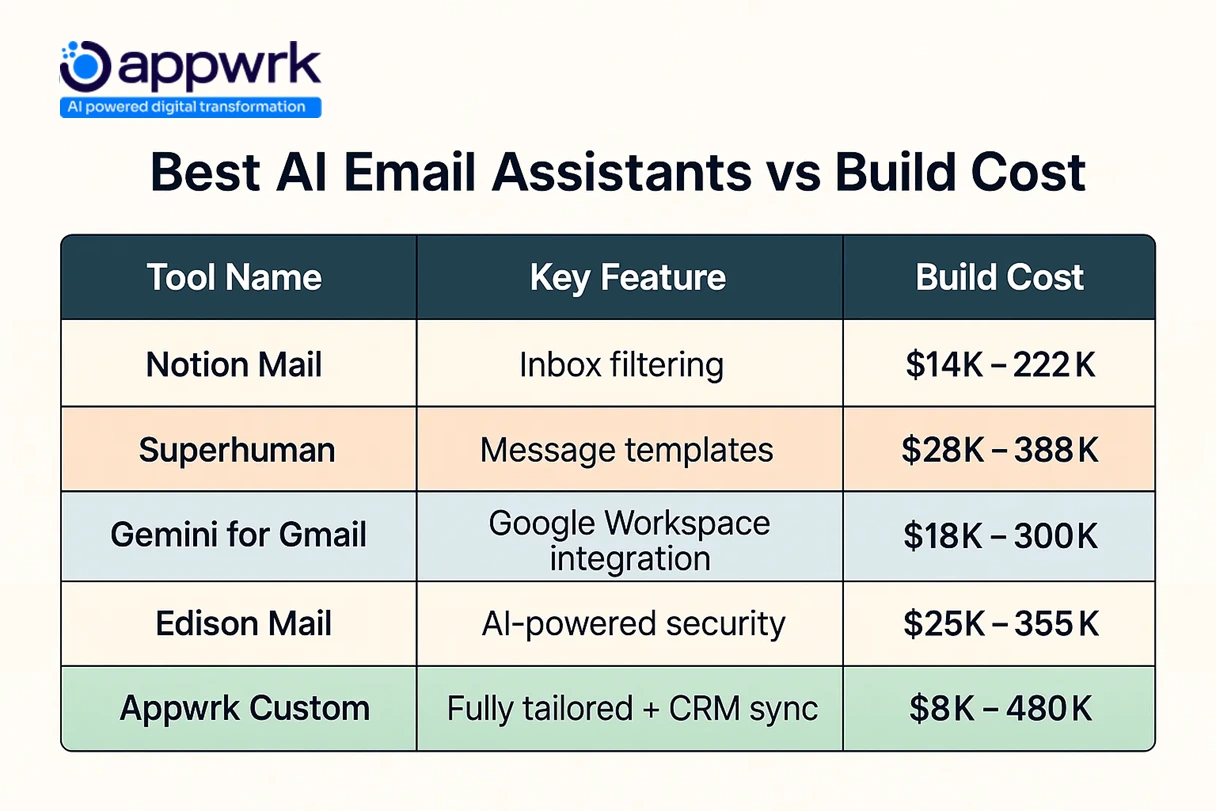
Here’s a categorized breakdown of the best AI email assistants in 2025, organized by their strongest use case, plus one custom, enterprise-grade build from Appwrk.
1. Best for Privacy – Proton Scribe
Use Case: Secure, encrypted email writing and replies Strength: Ideal for legal, healthcare, and compliance-driven teams
2. Best for Security – Edison Mail
Use Case: AI-powered spam filtering and phishing detection Strength: Built-in privacy and threat protection for individuals and teams
3. Best for Inbox Organization – SaneBox
Use Case: Auto-sorts emails by importance and behavior Strength: Keeps inbox zero effortlessly with AI-powered inbox filtering
4. Best for Apple Users – Apple Intelligence (Mail)
Use Case: On-device reply drafting and thread summarization Strength: Deeply integrated across iOS and macOS
5. Best for Google Workspace – Gemini for Gmail
Use Case: Smart replies, scheduling, and nudges inside Gmail Strength: Seamless integration with Gmail, Google Calendar, and Docs
6. Best for Enterprise Teams – Microsoft Copilot Pro (Outlook)
Use Case: AI-generated briefings, summaries, and automated replies Strength: Enterprise-ready, built for large teams on Microsoft 365
7. Best for AI-Powered Communication – Superhuman
Use Case: Shortcut-based drafting and thread summarization Strength: Designed for speed, tone consistency, and productivity
8. Best for Workflow Integration – Notion Mail + Notion AI
Use Case: Respond directly inside workspaces using task-linked context Strength: Combines email, projects, and docs for unified communication
9. Best Custom Solution – Appwrk’s AI Email Assistant
Use Case: Automates large-scale email management for enterprises Strength: Fully custom AI responder with CRM, helpdesk, and knowledge base sync
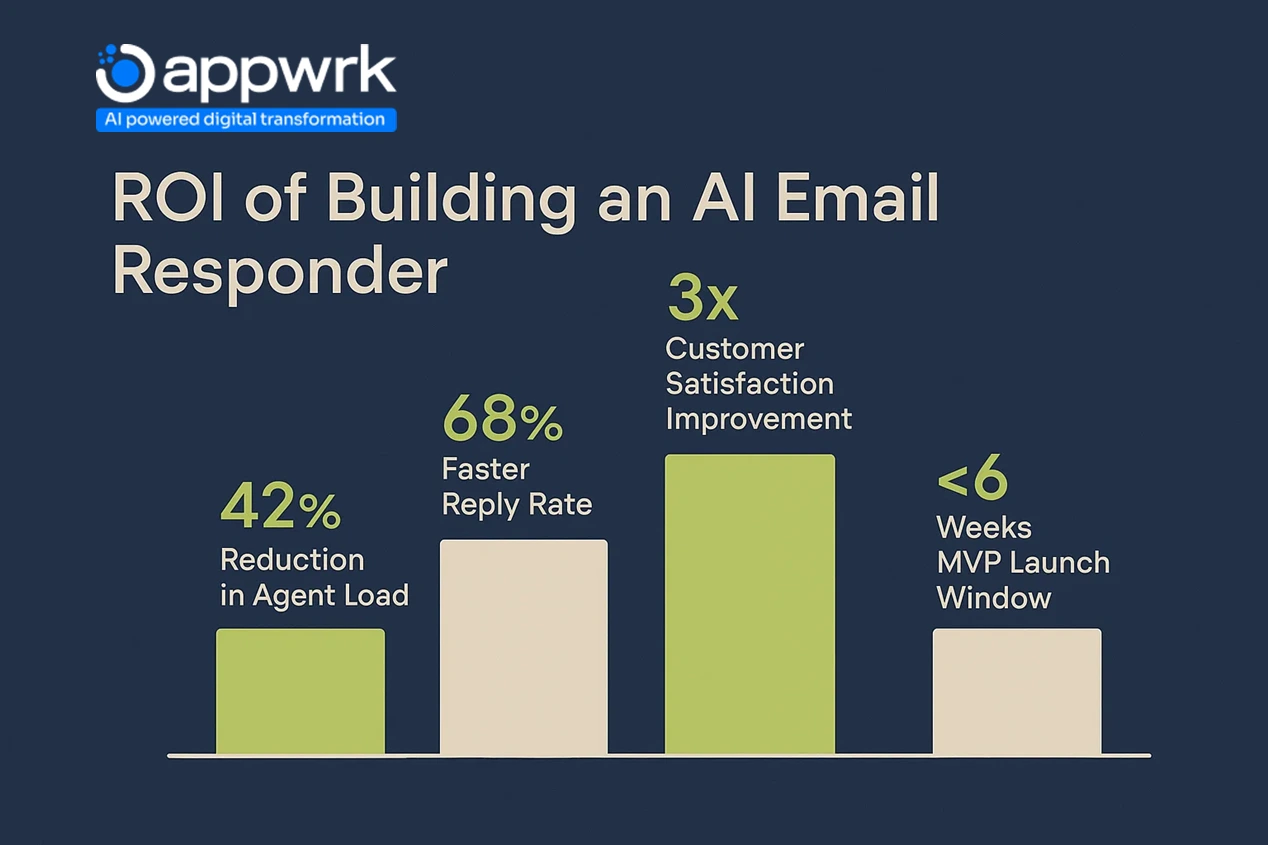
Appwrk Case Study: A global logistics company built an AI Email Responder with Appwrk to handle 18,000+ monthly messages, automatically routing by priority and department. The result: 42% workload reduction and 68% faster responses in under four months.
Go live, analyze results, and optimize based on performance
Total Timeline:6 to 10 weeks for full deployment, including integrations and fine-tuning.
What’s the ROI of Building an AI Email Assistant vs Using SaaS Tools?
A custom-built AI email assistant may cost more initially than SaaS subscriptions, but it delivers higher ROI once scaled, especially for teams handling large email volumes daily.
Time Savings: Reduces manual workload by up to 60% (as proven in Appwrk’s logistics case study).
Scalability: Manages up to 5x more messages with the same workforce compared to rule-based tools.
Cost Control: Avoids rising per-user pricing from SaaS platforms like Microsoft Copilot Pro or Notion AI.
Customer Satisfaction: Faster response times directly improve NPS, loyalty, and renewal rates. Unsurprisingly, Large Enterprises led the adoption of AI email assistants in 2023, capturing 72.4% of the market, driven by their scale, volume of communication, and need for automation.
A B2B startup automated 80% of its support inbox using a $12,000 custom AI Assistant. Within six months, it saved over 400 agent-hours, cut dependency on external support seats, and achieved break-even, while retaining full control over tone, data, and CRM logic.
How to Monetize AI Email Assistants After Launch
Once built, an AI email responder can evolve from an internal automation tool to a scalable SaaS product with recurring revenue.
1. SaaS Subscription Model
Offer tiered pricing by user count, usage limits, or features, similar to Superhuman or Gemini for Gmail.
2. API Monetization
Expose your AI responder via APIs for third-party integration, bill based on tokens, email volume, or reply complexity.
3. White Label Licensing
License your product to agencies or SaaS firms wanting branded AI responders, popular in B2B and IT service sectors.
4. Premium Add-Ons
Integrate your assistant into CRMs, HR, or support platforms as a premium module, e.g., tone training or reply analytics.
5. Usage-Based Pricing
Monetize based on emails processed, LLM token count, or agent bandwidth saved, scaling revenue with business size.
When built modularly with CRM integrations, multi-channel routing, and role-based workflows, AI responders become assets that pay for themselves, fast.
How to Integrate AI Email Assistants With CRMs, Voice, and Chat Platforms
Modern AI Virtual Assistants are most effective when embedded into existing tools. Integrations multiply ROI by creating continuous, automated workflows across communication channels.
CRM & Helpdesk Integration
Sync with HubSpot, Salesforce, or Zendesk to log replies, track leads, and generate contextual answers using customer history.
Bridge chatbots (e.g., WhatsApp or website bots) to AI responders, automatically escalating important leads to email follow-ups.
The result? Less manual handling, faster response cycles, and stronger cross-platform consistency, turning your AI Email Assistant into the operational center of all communication.
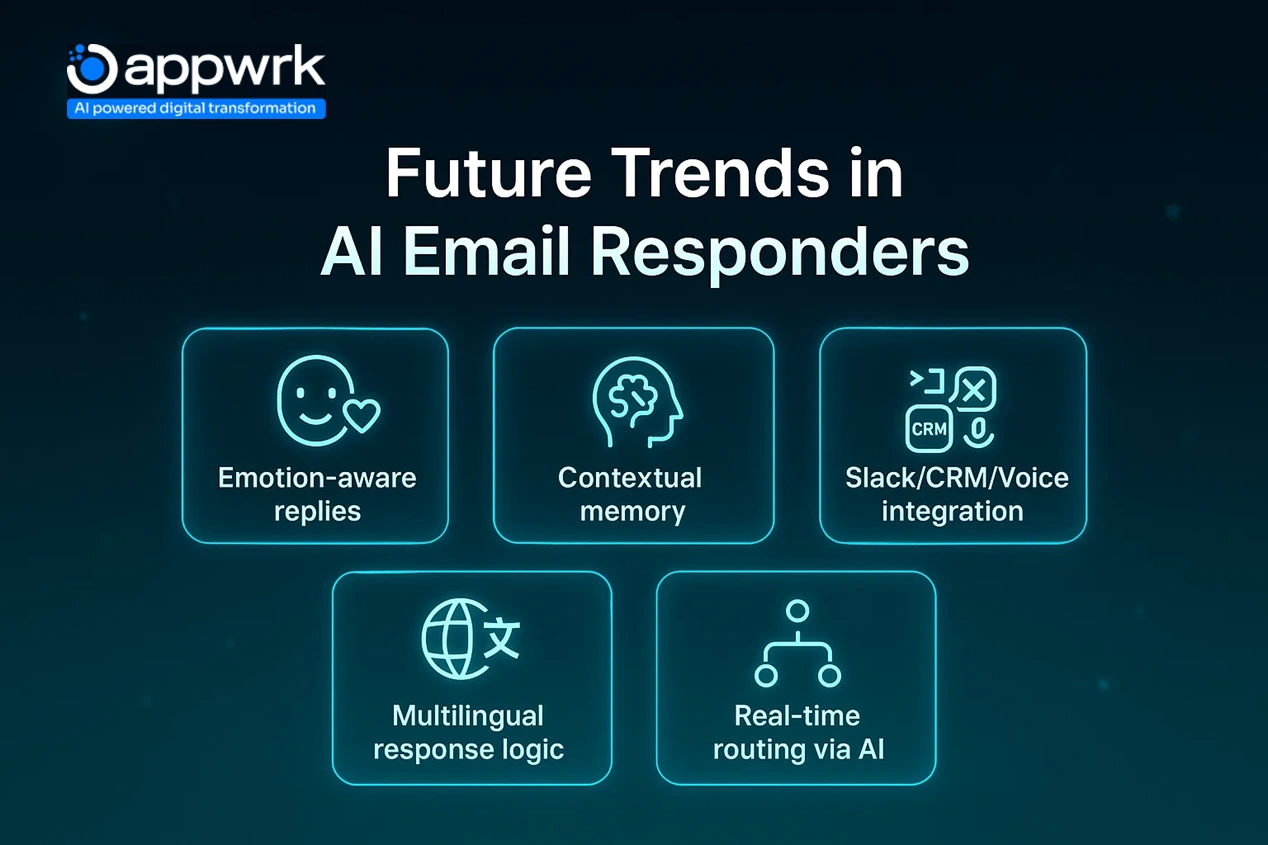
Future Trends in AI Email Assistant Development That Founders Should Know
The next phase of AI email assistant development is moving fast, blending automation, personalization, and emotional intelligence. Here’s what’s coming between 2025 and 2030:
1. Multimodal AI Email Assistants
Expect assistants to combine voice, text, and visuals for richer, more natural communication, connecting email with chat, video, and screen-based summaries.
2. Emotionally Aware Responses
AI email Assistants will analyze sentiment and intent, detecting tone, urgency, or frustration to adjust phrasing and protect customer satisfaction scores.
3. Native AI Integration in Email Clients
Platforms like Gmail, Outlook, and Notion Mail are embedding AI directly into their UI, making integrations seamless but increasing competition for independent tools.
4. Memory-Driven Reply Personalization
AI models will retain long-term context, remembering previous interactions and matching tone and brand voice across threads for true personalization.
5. AI-Powered Routing and Dispatch
Future systems will auto-triage and classify incoming emails, routing them to the right teammate, queue, or department, creating full AI sorting and dispatch assistants.
Founders who adopt these shifts early will build smarter, context-aware tools that redefine inbox productivity and deliver measurable ROI faster.
How Appwrk Can Help in AI Email Assistant Development
Appwrk builds secure, scalable, and high-performance AI Virtual Assistants for Gmail, Outlook, Notion Mail, and enterprise communication systems.
Why Teams Choose Appwrk
Proven Expertise: 70+ successful builds integrating OpenAI models, Microsoft 365 Copilot, and Slack APIs.
Speed to MVP: Go live in 6 to 10 weeks with a feature set covering reply generation, CRM sync, and NLP logic.
Scalable Architecture:Cloud infrastructure optimized for cost efficiency and zero downtime as usage scales.
Compliance Ready: SOC 2, ISO 27001, and GDPR-aligned, ideal for finance, healthcare, and B2B SaaS.
Full Integration Support: From Google Workspace to internal CRMs and custom APIs.
Case in Point:Appwrk built a custom AI email responder for a logistics enterprise handling 18,000+ monthly messages, reducing workload by 42% and response time by 68%.
Ready to automate your inbox without losing control? Book a consultation with Appwrk to plan your build, estimate costs precisely, and go from concept to ROI in weeks, not quarters.
Founder’s Guide to Launching a Custom AI Email Assistant Product
If you’re building your own AI Chatbot Personal Assistant or AI email Assistants, here’s the no-fluff roadmap to get from idea to launch, lean, fast, and investor-ready.
1. Define the Use Case
Pick one function to start, e.g., support replies, onboarding emails, or sales follow-ups. Avoid feature bloat early on.
2. Choose the Right Stack
Use pre-built APIs like ChatGPT, Claude, or Gemini for early speed. Layer a light front-end on Gmail or Outlook for testing.
3. Focus on Core Features
Prioritize auto-reply generation, email parsing, and CRM routing. Add multilingual or tone optimization later.
4. Build Lean, Scale Smart
Target an MVP budget of $8,000 to $15,000. Work with expert offshore teams in India or Eastern Europe to minimize upfront investment.
5. Integrate Early
Plan your syncs with Google Workspace, Microsoft Teams, or helpdesk tools during scoping, not post-launch.
6. Track ROI from Day One
Measure emails auto-closed, agent hours saved, and response accuracy to prove fast payback and attract investors.
1. How much does it cost to build an AI email assistant? The cost to build an AI email assistant ranges from $8,000 to $48,000, depending on model complexity, OpenAI models, NLP depth, and integrations with Gmail, Outlook, or Notion Mail. Hourly developer rates average $25 to $60/hour, influenced by geography, stack, and project scope.
2. Can I use AI to respond to emails? Yes. Tools like ChatGPT, Gemini for Gmail, and Notion AI can generate personalized replies, summarize threads, and optimize your inbox usage. You can even build your own AI Reply Assistant that matches tone, summarizes long threads, and connects directly with Google Workspace or Microsoft 365.
3. Are AI email Assistants free to use? Some free tools exist, such as Mailmeteor, Superhuman’s free tier, or Notion AI, but they’re limited. For AI-powered inbox filtering, workflow customization, and compliance-level privacy, teams typically shift to paid plans or custom-built assistants.
4. What is the 30% rule in AI? It’s a general guideline stating that AI automationshould handle up to 30% of repetitive workflows (like triage, classification, or auto-reply), leaving human oversight for sensitive or high-value communication.
5. How much does it cost to build an AI response generator? A basic AI response generatorstarts around $8,000. Builds with thread summarization, AI Sorting Assistants (for tagging and prioritizing), and workflow management features can reach $45,000+, depending on your integrations and training data.
6. What is the best free AI email assistant? Top options include Notion AI, Superhuman, SaneBox, and Mailmeteor. They’re best suited for individuals or light use. If you’re scaling across teams, a custom AI email responder offers better long-term ROI and data control.
7. How do I build my own AI email assistant? Start by defining your goal: auto-reply, AI-powered inbox filtering, or routing and dispatch. Use pre-built frameworks and APIs (like OpenAI or Zapier) and roll out in phases. For full builds, partner with an AI consulting company like Appwrk to minimize upfront investment and get end-to-end support.
8. What is the best AI email response generator in 2025? According to The 9 Best AI Email Assistants in 2025 list, top tools include Superhuman, Microsoft Copilot Pro, Gemini for Gmail, and Notion Mail + AI. Each offers unique standout features for Apple users, Google Workspace teams, and enterprises needing AI-powered generation with privacy.
9. Can AI help write professional emails? Absolutely. AI assistants can generate first-draft responses, match your brand voice, and even coach your tone in real time. Advanced tools can run sentiment and intent analysis, helping you maintain clarity and empathy in professional exchanges. Contact Appwrk to know more about their AI services.
10. What’s the difference between an AI email responder and a virtual assistant? An AI email responder focuses solely on inbox tasks, replying, triaging, and prioritizing emails for faster response cycles. A virtual assistant, on the other hand, adds broader features like calendar sync, CRM updates, voice commands, and customer support automation, functioning as a complete AI Chatbot Personal Assistant.
Gourav Khanna is the Co-founder and CEO of APPWRK, leading the company’s vision to deliver AI-first, scalable digital solutions for enterprises and high-growth startups. With over 16 years of leadership in technology, he is known for driving digital transformation strategies that connect business ambition with outcome-focused execution across healthcare, retail, logistics, and enterprise operations.
Recognized as a strategic industry voice, Gourav brings deep expertise in product strategy, AI adoption, and platform engineering. Through his insights, he helps decision-makers prioritize market traction, operational efficiency, and long-term ROI while building resilient, user-centric digital systems.
Subscribe to APPWRK Blogs, We'll Do the Rest!
Get Blogs on UI/UX, Mobile Apps, Online Marketing, and Web development technology.
Unlock worthy and priceless suggestions from the masters of mobile and web app development