150+ minds across 4 countries. Join a culture of innovation, ownership & growth.
Rewire for AI
From machine learning to deep learning, from classification tools to overall process automation – our AI engineers will help you retool your existing system or enhance your company results.
Ship faster, scale smarter, built for product companies and SaaS teams
Our Latest Work
We strive hard to deliver result-driven digital solutions across the globe. Check out our case studies to get a glimpse of how we ideate, innovate, and create unconventional digital solutions according to the requirements of our clients.
Discover diverse and passionate insights from our tech enthusiasts. We collaborate across various sectors to streamline operations and drive innovation. Explore our rapidly growing collection of articles to see why we’re at the forefront of IT solutions.
The decision to move from Magento to Shopify is one of the most significant replatforming choices an ecommerce business can make. Magento is powerful, but its power comes with...
Accuracy gap is real: Traditional CPG forecasting carries a 25-40% MAPE error rate. AI-powered models bring that down to 8-15%, according to McKinsey research....
Real stories from global leaders who trusted us with their ideas.
Partnering with APPWRK helped us build a compliant and scalable healthcare platform, accelerating our time-to-market by 35%. Their team consistently delivered outstanding work.
Beesers
Digital Healthcare Client
Collaborating with APPWRK, Sportskeeda modernized its platform into a real-time sports engagement ecosystem, enabling seamless content delivery, scalable fan interactions, and high-velocity performance.
Sportskeeda
Sports & Entertainment Partner
Working with APPWRK was effortless. They captured our vision, maintained full compliance, and delivered a digital experience that built trust and elevated how customers interact with our fintech brand.
PayPenny
Fintech Partner
Working with APPWRK gave us confidence in adopting AI responsibly. Their team built a safe, intelligent bot that transformed how we engage with leads and helped us achieve measurable revenue growth.
IFB
AI Transformation Partner
Leveraging APPWRK’s digital expertise, Nemesis launched a scalable, compliant, and safe super app that connects content delivery, real-time communication, and logistics management within a single platform.
Nemesis
Super App Partner
Choose Tools That Actually Scale Growth
Appwrk helps teams implement and integrate social platforms that drive real business outcomes.
If you’re hunting for the best social media management tools, this guide is built for you. Whether you run a startup, manage campaigns for an agency, or juggle multiple platforms as a solo creator, the right social media scheduler apps can save you hours every week.
Here’s what you’ll find inside:
A clear breakdown of features, pricing, pros, and cons for the top 16 social media scheduling software options, so you can choose with confidence.
The difference between free vs. paid social media management platforms and when it’s worth upgrading.
Use-case recommendations that match the right scheduler to your team size, workflow, and budget.
By the end, you’ll know exactly which social media scheduling tool fits your business, what it will cost, and how it impacts ROI.
Pallyy is a lightweight yet powerful social media scheduler app that shines for visual-first planning. It’s especially popular among content creators who prioritise Instagram but still want cross-platform publishing.
Key Features
Visual drag-and-drop social media calendar.
Instagram-first tool with link-in-bio support and SmartLinks.
Bulk scheduling across multiple platforms.
Supports hashtag collections for faster publishing.
Pros
Excellent for visual planning.
Affordable compared to bigger social media management platforms.
Cons
Analytics remain limited outside Instagram.
Pricing Plans start at $18/month with a free version available.
Suitable For Content creators and small teams that want a simple, affordable social media scheduling software focused on visuals.
Viraly Review
Viraly is a newer social media scheduler app that leans heavily on AI to help creators and startups stay ahead of trends without spending hours on manual research.
Hashtag collections and trend discovery to improve reach.
Multi-platform publishing with RSS feed support.
Pros
Strong AI-driven insights that cut guesswork.
Simple, user-friendly interface for beginners.
Cons
Still evolving, lacks some advanced features found in mature social media management platforms.
Pricing Affordable plans start under $20/month.
Suitable For Startups and solopreneurs looking for an AI-backed social media scheduling software that simplifies posting.
Metricool Review
Metricool combines social scheduling with ad performance tracking, making it one of the few social media management platforms that doubles as an analytics suite.
Great for branding consistency through watermarks.
Cons
Advanced functions may feel overwhelming for first-time users.
Pricing Free plan available; paid plans start at $12/month.
Suitable For Budget-conscious creators and small businesses who need a free social media scheduler with upgrade flexibility.
Agorapulse Review
Agorapulse positions itself as a premium social media management tool, trusted by agencies and mid-sized businesses that need more than just scheduling.
Key Features
Unified inbox for brand mentions, comments, and reviews (review management).
Advanced reporting dashboards and competitor analysis.
Role-based access and approval workflows for team collaboration.
Pros
Best-in-class reporting and competitor research features.
Strong customer support.
Cons
Pricing is on the higher side compared to lighter social media scheduler apps.
Great fit for brands that prioritize performance monitoring.
Cons
More expensive than basic social media scheduler apps.
Pricing Starts at $49/month.
Suitable For Brands and agencies are looking for an analytics-first social media management platform.
Later Review
Later is one of the most popular Instagram-first social media scheduling tools, especially loved by eCommerce brands.
Key Features
Visual Instagram planner with drag-and-drop scheduling.
Link-in-bio features (SmartLinks / Start Page) for eCommerce.
Works with TikTok, Facebook, Pinterest, LinkedIn, and Threads.
Pros
Excellent for e-commerce and influencer campaigns.
Strong integration with Instagram.
Cons
Reporting features aren’t as deep as competitors like Sprout or Agorapulse.
Pricing Free plan available; paid plans start at $18/month.
Suitable For E-commerce brands, influencers, and small businesses who want a visual-first social media management tool.
Sprout Social Review
Sprout Social is one of the most advanced social media management platforms, offering more than just scheduling. It’s a full-suite tool built for enterprises and agencies.
Reporting dashboards with competitor benchmarking.
Pros
Strong content discovery engine for trend-based posts.
Good mix of scheduling, analytics, and collaboration.
Cons
Slightly more complex to set up than tools like Buffer or Loomly.
Pricing Starts at $25/month.
Suitable For Marketers and agencies who want a complete social media scheduling software with content discovery and analytics built in.
The best social media scheduling tools aren’t just about automating posts; they’re about helping you build consistency, track performance, and manage engagement across multiple channels. Whether you’re a solo creator looking for a lightweight social media scheduler app like Buffer or an enterprise in need of a full-stack social media management platform like Sprout Social, there’s a tool here to match your workflow and budget.
OnQue – A Social Media Scheduler Built by Appwrk
Why OnQue Was Built
At Appwrk, we saw a clear gap in existing social media management tools. Agencies and growing businesses were forced to choose between clunky free social media scheduler apps or expensive enterprise social media management platforms. Multi-client scheduling, inbox monitoring, and CRM integrations often came at a steep price. OnQue was built to deliver these capabilities at a cost startups and agencies can actually afford, making it one of the best social media management tools.
Core Functionalities of OnQue
Multi-platform scheduling → Publish to Facebook, LinkedIn, YouTube, Pinterest, Instagram, Tumblr, Bluesky, and upcoming networks like Mastodon, Threads, Reddit, and Twitch.
Content calendar with drafts → Visual drag-and-drop planner to organise posts, edit content, and group campaigns by content categories or post variants.
Inbox monitoring (Smart Inbox) → Unified inbox to track replies, comments, direct messages, and brand mentions across profiles.
Native IG scheduling exists, but is limited vs Pallyy
Sendible
20+ social accounts
Advanced
Yes
Outperforms native with client reporting
Viraly
FB, IG, TikTok
Moderate
Limited
Native can’t recycle content, Viraly can
Metricool
FB, IG, LinkedIn, TikTok, YouTube
Strong
No
Native doesn’t provide unified analytics
Publer
FB, IG, LinkedIn, Pinterest, TikTok
Yes
No
Goes beyond native with bulk scheduling
Agorapulse
FB, IG, Twitter/X, LinkedIn, TikTok
Advanced
Yes
Native lacks inbox + monitoring
HopperHQ
Instagram, LinkedIn, TikTok
Moderate
Limited
Native IG scheduler lacks analytics
Iconosquare
IG, FB, TikTok
Strong
No
Offers analytics missing in native tools
Later
IG, TikTok, Pinterest
Moderate
Limited
Pinterest native is weak compared to Later
Sprout Social
Full coverage (10+ networks)
Enterprise-grade
Yes
Replaces multiple native schedulers
Buffer
FB, IG, LinkedIn, TikTok, YouTube
Basic
Limited
Native lacks cross-platform posting
Hootsuite
20+ networks
Enterprise-grade
Yes
Stronger than all native apps combined
ContentStudio
FB, IG, LinkedIn, TikTok, YouTube
Advanced
Yes
Includes RSS + curation missing in native
Vista Social
FB, IG, TikTok, YouTube, LinkedIn
Strong
Yes
Native can’t auto-publish or track ROI
HubSpot Social
FB, IG, LinkedIn, Twitter/X
Enterprise-grade
Yes
Combines CRM + scheduler, native doesn’t
Other Social Media Scheduling Tools Worth Exploring
Not every team needs the same social media scheduling software. Some want visual-first planning, others need enterprise social media management platforms, while agencies often demand white-label social media scheduler apps. Here’s a quick look at more of the best social media management tools you should explore.
Onlypult Review
Key Features
Schedule posts for Instagram, TikTok, and YouTube.
Competitor analysis and monitoring tools.
Built-in image and video editing.
Suitable For Influencers and creators who need a visual-first scheduler with competitor research and review management features.
Suitable For Small businesses focused on local posting that want practical social media management tools.
What is a Social Media Scheduling Tool?
A social media scheduling tool is software that lets you plan, create, and publish posts across platforms without logging into each account one by one. Instead of manual posting, a social media scheduler app automates publishing at the right time to maximize engagement.
At its core, these tools act as digital calendars where you line up posts, preview how they’ll look, and let automation take care of publishing. The best social media management tools go beyond scheduling; they add analytics, collaboration, and optimization so your brand can grow consistently.
In short, a good scheduler removes the guesswork from posting and helps you focus on strategy, content categories, and community engagement.
What Makes the Best Social Media Scheduling Tool?
Not all social media management platforms are built the same. The best tools combine automation, analytics, and ease of use so teams can scale without chaos.
When evaluating social media scheduling software, look for:
Multi-platform scheduling – support for Facebook, Instagram, LinkedIn, TikTok, YouTube, Mastodon, Threads, Reddit, and Twitch.
Content calendar view – organize campaigns visually with post variants and hashtag collections.
Automation options – recycle evergreen posts (MeetEdgar-style), auto-publish, or suggest best times.
Collaboration tools – approval workflows, role-based access, and team dashboards.
Integrations – connect with Canva, Google Drive, Trello integration, Notion integration, Google Sheets integration, or Slack automation.
A social media scheduler app that checks these boxes becomes more than a posting tool; it becomes a growth engine for brand visibility, audience engagement, and ROI.
Buffer (Free Plan) → Connect up to 3 social accounts and schedule 10 posts per account. A simple post scheduler with SmartLinks (Start Page) for beginners.
Later (Free Plan) → Drag-and-drop calendar built for Instagram-first creators. Great for visual planning and content curation tools.
Publer (Free Plan) → Multi-platform auto-scheduling with flexible post variants. Strong for small businesses exploring social media posting tools before upgrading.
Metricool (Free Plan) → Combines scheduling with analytics and a Looker Studio connector for deeper insights.
Why Free Tools Matter
Test features before committing to premium.
Support consistent posting and brand mentions.
Provide basic analytics and engagement tracking.
For creators, free schedulers like Later or Publer are the best way to build momentum before upgrading to full social media management platforms.
Which Social Media Posting Tools Help Manage Multiple Accounts?
Managing multiple accounts can be overwhelming. That’s where social media scheduling software with multi-account dashboards comes in.
Best Social Media Management Platforms for Multi-Account Use
Hootsuite → Handles dozens of accounts with scheduling, monitoring, and competitor analysis.
Sprout Social → Built for teams, featuring a Smart Inbox, review management, and approval workflows.
Sendible → Popular with agencies thanks to white-label reports and multi-client management.
SocialPilot → Affordable alternative with bulk scheduling and social media streams monitoring.
Why It Matters
Centralizes scheduling and approval workflows.
Saves time and avoids posting errors.
Makes scaling easier for agencies managing many brands.
If you juggle multiple accounts, tools like Sprout Social, SocialPilot, or Vista Social provide agency-level social media scheduler apps without enterprise costs.
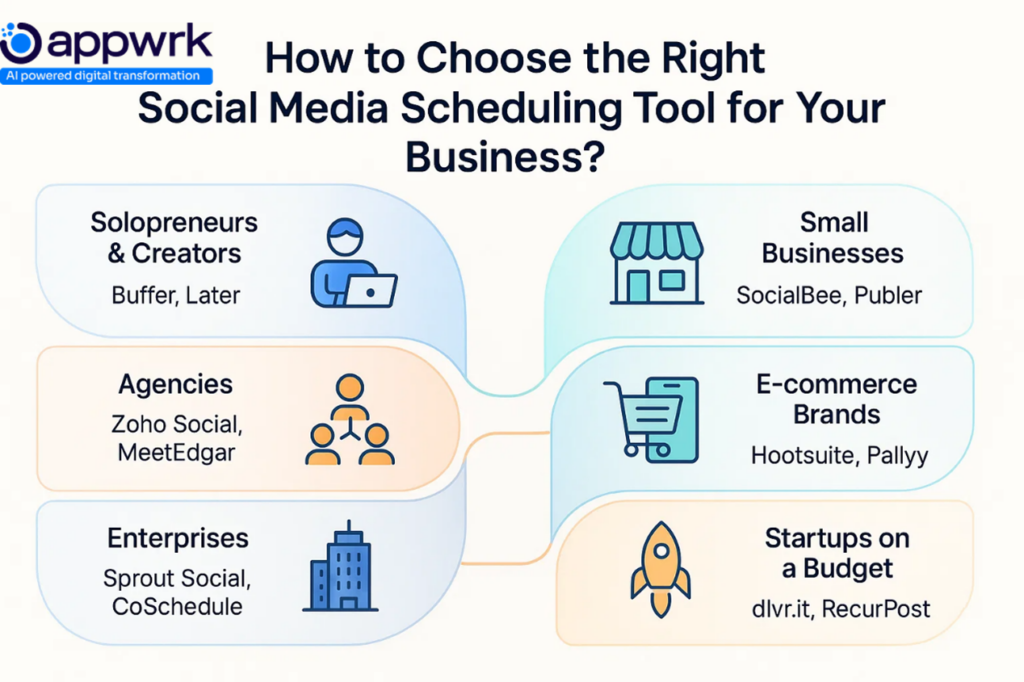
How to Choose the Right Social Media Scheduling Tool for Your Business
Not every social media scheduler app is built for the same audience. The best choice depends on your team size, industry, and the complexity of your social media management tools.
For Solopreneurs and Creators
Start simple with Buffer or Later. Both are easy-to-use social media scheduling software with visual calendars, draft caption tools, and basic analytics. Perfect if you just want consistency without advanced features.
For Small Businesses
Go for SocialBee (with AI Copilot) or Publer. These social media posting tools balance affordability with automation, reporting dashboards, and customer support, great for small teams building momentum.
For Agencies
Choose Sendible or SocialPilot. They support multiple accounts, white-label client reports, approval workflows, and inbox monitoring for direct messages, exactly what agencies need.
Pick Later or Metricool. Both are visually driven social media management platforms with link-in-bio (SmartLinks), cross-platform scheduling, and a Looker Studio connector to track sales-driven campaigns.
Invest in Hootsuite or Sprout Social. These robust social media scheduling platforms integrate with CRMs, pull in Google Analytics, and provide role-based access for large departments.
For Startups on a Budget
Try Vista Social or Typefully. Affordable yet powerful, they integrate with Zapier and support emerging networks like Bluesky, Threads, Reddit, and Mastodon.
From Buffer’s simplicity to Hootsuite’s enterprise power, the right social media scheduler app depends on aligning features with your goals.
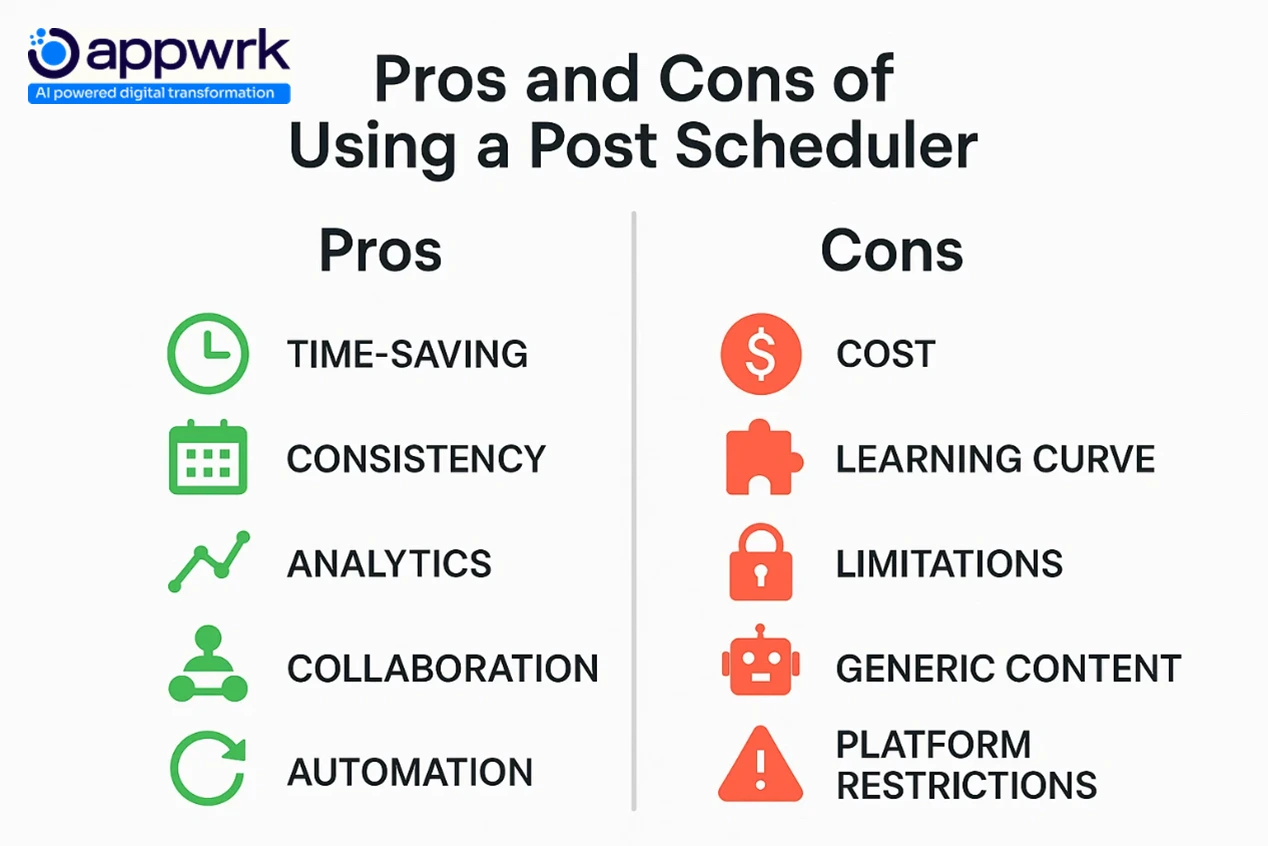
What Are the Pros and Cons of Using a Post Scheduler?
A post scheduler makes it easier for brands, creators, and agencies to manage multiple accounts. Like any tool, there are advantages and limitations. Knowing both helps you choose the best social media management tool for your needs.
Pros of Using a Post Scheduler
Time-saving → Schedule weeks of posts in one sitting.
Consistency → Stay active with a steady posting flow, key to audience growth.
Multi-platform efficiency → Manage all profiles in one dashboard with social media streams.
Analytics & insights → Most tools offer reporting dashboards to track ROI and engagement tracking.
Collaboration → Assign roles, set approval workflows, and manage client accounts smoothly.
Content optimization → Features like evergreen recycling (MeetEdgar) or AI Copilot in SocialBee suggest best posting times and improve reach.
Integration flexibility → Connect with Notion integration, Trello integration, Google Sheets integration, or Slack automation to fit existing workflows.
Cons of Using a Post Scheduler
Cost factor → Premium plans can be pricey for small teams.
Learning curve → Advanced social media management platforms can overwhelm beginners.
Free plan limits → Restrictions on accounts or scheduled posts.
Generic content risk → Over-reliance on automation may reduce authenticity.
Platform restrictions → Some networks limit features (like tagging or advanced publishing) through third-party schedulers.
Over-scheduling → Planning too far ahead can miss out on real-time trends or brand mentions.
Bottom line: a social media scheduling tool saves time and improves results, but it works best when paired with real-time engagement and thoughtful content curation.
Social Media Scheduling Tools vs Native Platform Scheduling
Deep reporting + Google Analytics integrations; ROI proof for leadership
Collaboration
Mostly individual use, no team features
Role-based access, content approvals, inbox monitoring for replies & messages
Integration
No integration with apps
Connects with Zapier, APIs, Canva, CRMs, and Typefully for extended workflows
Scalability
Best for solo use
Designed for agencies, businesses, and enterprises handling multiple clients
Cost
Free, included with the network
Starts free (Buffer, Later) → paid plans for advanced scheduling
In short, while native schedulers work for small needs, social media management platforms like Vista Social, Hootsuite, Buffer, Sendible, and Loomly deliver the scalability and integrations modern audiences expect.
How Much Do Social Media Scheduling Tools Cost?
The cost of social media scheduling tools varies widely depending on features, number of accounts, and team size. From a free social media scheduler for individuals to advanced post schedulers for enterprises, pricing is flexible.
Average Pricing for Social Media Scheduling Tools
Plan Type
Price Range
Best For
Free Plans
$0
Solo creators are testing free social media scheduling tools
Entry-Level Plans
$10 – $30/month
Small businesses or startups using basic post schedulers
Professional Plans
$25 – $70/month
Marketing teams needing collaboration + analytics
Agency Plans
$50 – $150/month
Agencies managing multiple accounts with reporting
Enterprise Plans
$200+/month
Enterprises needing advanced social media scheduler tools with integrations and ROI tracking
Key Pricing Insights
Free social media scheduling tools are best for testing, but have strict limits.
Most reliable social media posting tools start at around $20/month.
Agencies often need multi-account post schedulers with reporting, which average $50–$150/month.
Large enterprises pay a premium for advanced features like social listening and CRM integrations.
In short, the pricing of social media scheduling tools depends on scale. Free works for beginners, but growing teams will need paid plans for efficiency.
What Are the Benefits of Social Media Scheduling Tools?
A social media scheduling tool is more than convenience. The right platform saves time, boosts engagement, and strengthens ROI across campaigns.
Tactical Benefits of Social Media Scheduling Tools
Time efficiency → Schedule posts in advance with a post scheduler instead of logging in daily.
Consistency → Maintain a steady posting rhythm, improving brand trust and reach.
Multi-platform coverage → Manage accounts on Instagram, LinkedIn, Mastodon, Threads, Reddit, and more through one dashboard.
Content organization → Use calendars and content categories in social media scheduler apps to plan better.
Strategic Benefits of Social Media Scheduling Tools
Better engagement → Post at the right time for stronger interactions.
ROI measurement → Built-in reporting dashboards track clicks, conversions, and audience growth.
Scalability → Agencies and teams handle multiple clients without extra workload.
Competitive edge → Features like trending hashtags, competitor analysis, or AI Copilot (SocialBee) help you stay ahead.
In short, the benefits of social media management tools go beyond publishing; they enable smarter growth, better engagement, and measurable impact.
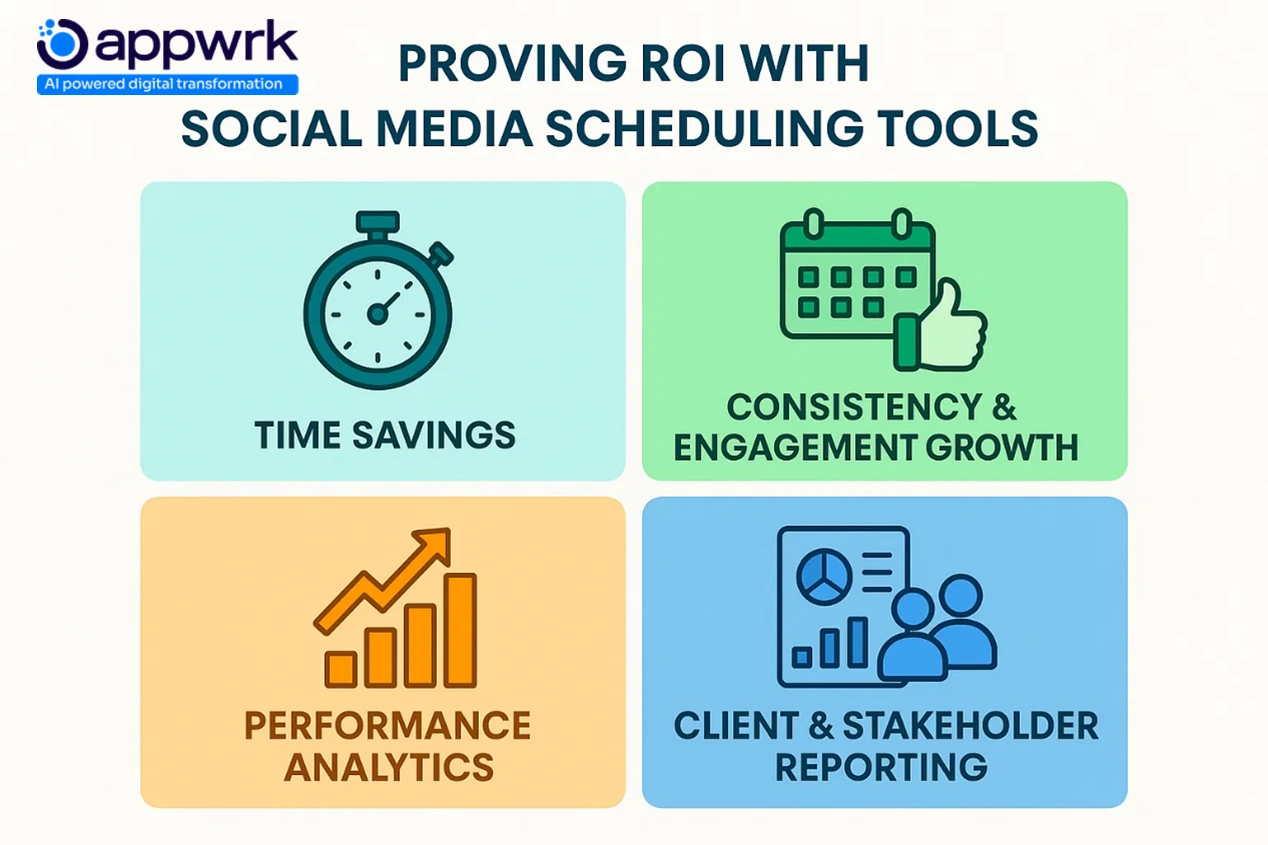
How Do Social Media Scheduling Tools Help Prove ROI to Leadership or Stakeholders?
Leaders want proof that marketing delivers measurable returns. A social media scheduling software turns everyday activity into clear ROI metrics.
ROI Dimensions Proved by Social Media Scheduling Tools
Time savings → Automation reduces manual work hours per campaign.
Consistency = engagement → A steady social media posting schedule builds predictable audience growth.
Performance analytics → Tools like Metricool (with a Looker Studio connector) and Sprout Social show traffic, conversions, and social media streams tied to revenue.
Cost efficiency → One dashboard replaces multiple platforms or extra staff.
Client & stakeholder reporting → Sendible, SocialPilot, and Zoho Social offer white-label reports for clients, proving ROI clearly.
The best social media management tool proves its value by showing executives numbers they care about: time saved, growth achieved, and revenue impact.
Which Social Media Scheduling Platforms Work Best with Zapier, Google Analytics, Canva, and CRM?
Integrations turn a basic scheduler into a complete social media management platform. Here’s where top tools shine:
Zapier integrations → Vista Social, Typefully, Sendible, and Hootsuite automate workflows with RSS feeds, content curation tools, and bulk publishing.
Google Analytics → Buffer, Sprout Social, and Hootsuite connect campaigns directly to ROI reporting dashboards.
Canva integration → Loomly, Buffer, and Vista Social let you design and post visuals without leaving the scheduler.
CRM integrations → Sprout Social, Sendible, and SocialPilot connect with CRMs for inbox replies, review management, and customer pipelines.
Other integrations → Notion integration, Trello integration, Google Sheets integration, and Slack automation extend flexibility for hybrid teams.
With these integrations, social media scheduler apps evolve into all-in-one tools that tie content creation, engagement tracking, and business outcomes together.
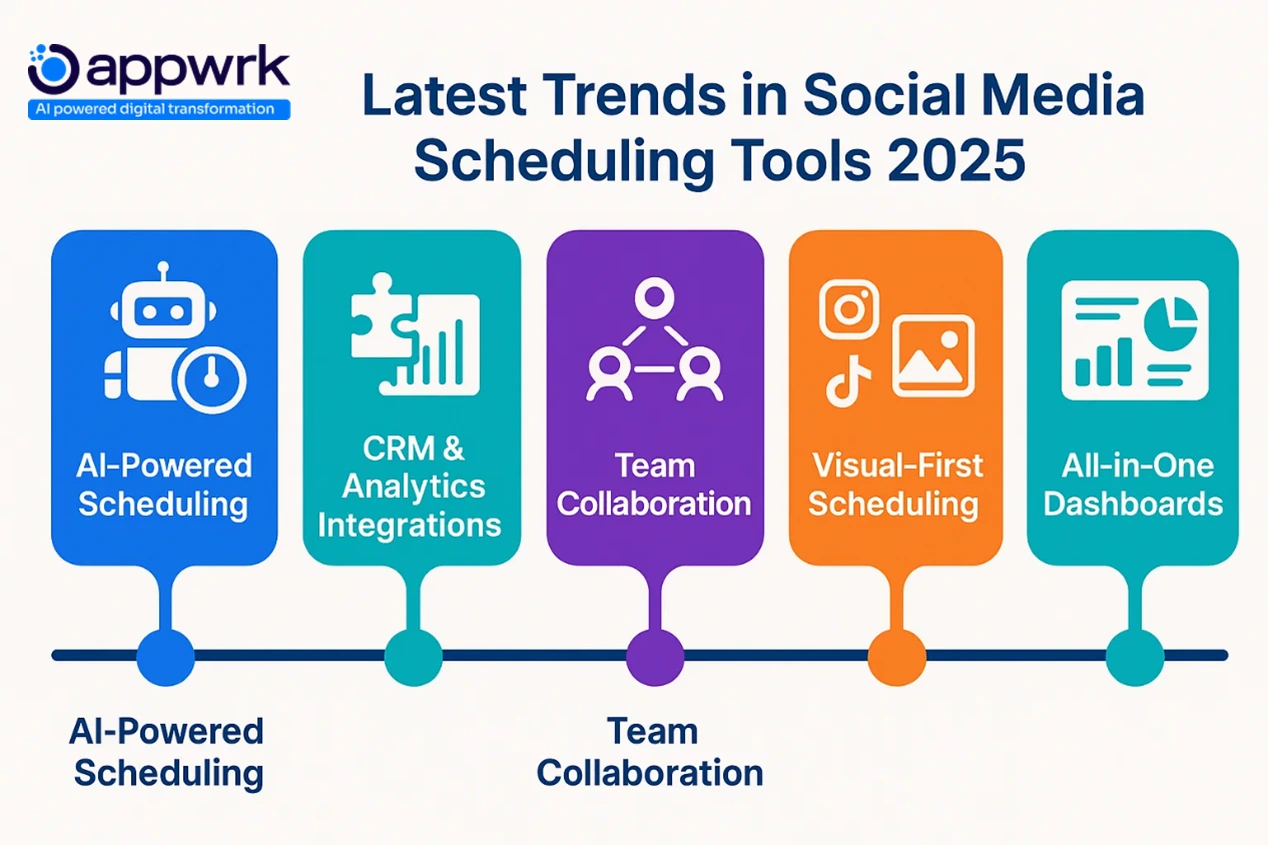
What Are the Latest Trends in Social Media Scheduling Tools?
Enterprises demand more than posting. Tools like Sprout Social and HubSpot Social integrate CRMs, social listening, and analytics into one suite.
Collaboration Features for Teams
Remote work has fueled demand for approval workflows, shared calendars, and role-based access in social media scheduler apps.
Visual-First Scheduling for Creators
With Instagram, TikTok, and Pinterest leading, tools like Later and Sked Social offer drag-and-drop planners and hashtag collections to optimize visuals.
All-in-One Marketing Dashboards
Platforms like Statusbrew and Sprinklr combine scheduling, brand mentions monitoring, influencer tracking, and reporting dashboards to reduce tool overload.
These trends show a shift: social media management platforms are no longer just posting apps; they’re strategic hubs for engagement, compliance, and business growth.
Selection Criteria for Social Media Scheduling Tools
Picking the right social media scheduling software isn’t about what’s most popular; it’s about what works for your business workflow. Here’s what to look for when evaluating social media management tools.
Platform Coverage
A reliable post scheduler should support all major networks: Facebook, Instagram, LinkedIn, TikTok, Twitter/X, and even emerging platforms like Mastodon, Threads, Reddit, and Twitch.
Ease of Use
The best social media management tool has an intuitive dashboard, drag-and-drop calendar, and simple navigation so your team spends more time creating content, not learning the tool.
Analytics and Reporting
Look for social media management platforms with reporting dashboards, engagement tracking, and integrations like the Looker Studio connector (Metricool) or Google Analytics to tie posts to ROI.
Collaboration and Workflow
Agencies and growing teams need approval workflows, shared calendars, and role-based access to avoid bottlenecks. Features like Smart Inbox for unified replies save hours of manual monitoring.
Pricing and Scalability
From free starter plans (Buffer, Later) to enterprise-ready social media scheduler apps (Sprinklr, Hootsuite), choose a tool that fits today’s budget but scales as you grow.
By using these criteria, you’ll avoid tools that are overbuilt for your needs or too basic for growth.
How Appwrk Can Help in Social Media Scheduling App Development
Building or scaling a social media scheduler app takes more than coding. You need expertise in automation, integrations, analytics, and user adoption, the exact pillars Appwrk specializes in.
End-to-end development → From MVP launch to enterprise-grade social media scheduling tools.
Integration expertise → Connect schedulers with CRMs, Google Analytics, Canva, or even niche integrations like Notion, Trello, Google Sheets, and Slack automation.
Scalable architecture → Design social media management platforms that grow with you without performance bottlenecks.
Performance + retention tracking → Embed analytics that prove ROI to leadership and stakeholders.
Whether you’re a startup testing an MVP or an enterprise ready for an all-in-one social media management platform, Appwrk ensures your product is competitive, reliable, and adoption-ready.
FAQs
Is there a free way to schedule social media posts? Yes. Tools like Buffer and Later offer free plans with limited accounts. They’re great for testing ideas before moving to premium social media management platforms.
Which is better, Buffer or Hootsuite? Buffer is simple and budget-friendly, ideal for creators. Hootsuite is a full-scale social media management platform with advanced analytics, inbox monitoring, and social media streams for multiple clients.
Can I schedule posts to multiple social accounts at once? Yes. Social media scheduler apps like Sendible, Vista Social, Zoho Social, and Loomly allow multi-account scheduling across networks, including LinkedIn, Pinterest, and YouTube.
Do scheduled posts get fewer views than manual posts? No. Properly managed scheduled posts often perform better thanks to optimized timing, SmartLinks (Buffer, Metricool), and AI Copilot recommendations (SocialBee).
Does Google have a social media scheduling option? Not directly. Google doesn’t offer a standalone social media scheduling software, but Zapier or RSS feeds can automate publishing to YouTube and Blogger.
Do social media management platforms integrate with CRMs or analytics? Yes. Tools like Sprout Social, SocialPilot, and Typefully connect with CRMs, Google Analytics, and WhatsApp Business. Zapier integrations also extend into review management and campaign updates.
What is the 555 rule in social media? It’s a content balance guideline: 5 industry posts, 5 original posts, and 5 engagement-driven posts. It keeps your content categories diverse without spamming followers. Need help building a social media strategy that goes beyond the 555 rule? Appwrk’s team can craft tailored content plans and automation workflows for your brand. Contact us now.
How do scheduling apps help with replies and messages? Most social media management tools include a Smart Inbox. Hootsuite, Sendible, and Vista Social consolidate comments, DMs, and mentions across accounts into one feed.
Which platforms work best for visual content like Instagram and Pinterest? Later, Loomly, and Sked Social are tailored for visual-first scheduling with hashtag collections, media libraries, and link-in-bio features.
Do schedulers support less common networks like Bluesky, Tumblr, or YouTube? Yes. Tools like Typefully and Vista Social expand to emerging networks. Some also support Tumblr, Twitch, and Mastodon via APIs or Zapier.
What is OnQue, and how does it compare to other social media management platforms? OnQue is Appwrk’s modern social media scheduler app, built for affordability and scalability. Unlike traditional platforms like Hootsuite or Buffer, OnQue offers features like Zapier workflows, Google Analytics integration, AI-powered draft captions, and inbox monitoring, making it ideal for agencies and startups.
Gourav Khanna is the Co-founder and CEO of APPWRK, leading the company’s vision to deliver AI-first, scalable digital solutions for enterprises and high-growth startups. With over 16 years of leadership in technology, he is known for driving digital transformation strategies that connect business ambition with outcome-focused execution across healthcare, retail, logistics, and enterprise operations.
Recognized as a strategic industry voice, Gourav brings deep expertise in product strategy, AI adoption, and platform engineering. Through his insights, he helps decision-makers prioritize market traction, operational efficiency, and long-term ROI while building resilient, user-centric digital systems.
Subscribe to APPWRK Blogs, We'll Do the Rest!
Get Blogs on UI/UX, Mobile Apps, Online Marketing, and Web development technology.
Unlock worthy and priceless suggestions from the masters of mobile and web app development