150+ minds across 4 countries. Join a culture of innovation, ownership & growth.
Rewire for AI
From machine learning to deep learning, from classification tools to overall process automation – our AI engineers will help you retool your existing system or enhance your company results.
Ship faster, scale smarter, built for product companies and SaaS teams
Our Latest Work
We strive hard to deliver result-driven digital solutions across the globe. Check out our case studies to get a glimpse of how we ideate, innovate, and create unconventional digital solutions according to the requirements of our clients.
Discover diverse and passionate insights from our tech enthusiasts. We collaborate across various sectors to streamline operations and drive innovation. Explore our rapidly growing collection of articles to see why we’re at the forefront of IT solutions.
The decision to move from Magento to Shopify is one of the most significant replatforming choices an ecommerce business can make. Magento is powerful, but its power comes with...
Accuracy gap is real: Traditional CPG forecasting carries a 25-40% MAPE error rate. AI-powered models bring that down to 8-15%, according to McKinsey research....
Real stories from global leaders who trusted us with their ideas.
Partnering with APPWRK helped us build a compliant and scalable healthcare platform, accelerating our time-to-market by 35%. Their team consistently delivered outstanding work.
Beesers
Digital Healthcare Client
Collaborating with APPWRK, Sportskeeda modernized its platform into a real-time sports engagement ecosystem, enabling seamless content delivery, scalable fan interactions, and high-velocity performance.
Sportskeeda
Sports & Entertainment Partner
Working with APPWRK was effortless. They captured our vision, maintained full compliance, and delivered a digital experience that built trust and elevated how customers interact with our fintech brand.
PayPenny
Fintech Partner
Working with APPWRK gave us confidence in adopting AI responsibly. Their team built a safe, intelligent bot that transformed how we engage with leads and helped us achieve measurable revenue growth.
IFB
AI Transformation Partner
Leveraging APPWRK’s digital expertise, Nemesis launched a scalable, compliant, and safe super app that connects content delivery, real-time communication, and logistics management within a single platform.
Nemesis
Super App Partner
Build Smarter CMMS. Partner for Transformation.
Collaborate with a technology partner to modernise maintenance operations, improve asset reliability, and drive measurable operational transformation.
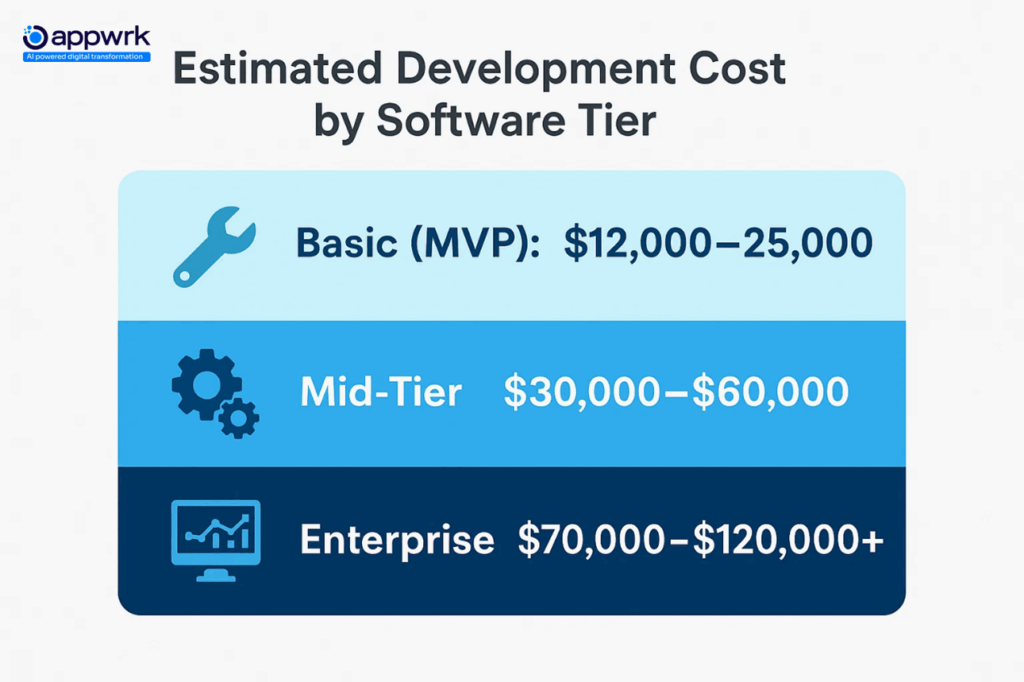
The cost to build a CMMS software ranges between $15,000 and $25,000 for an MVP. Hourly development rates range from $18 to $45, depending on location.
Mid-range builds with custom modules and role-based access cost $40,000 to $85,000.
Enterprise-grade CMMS (Computerised Maintenance Management System) with AI, IoT, and offline access can cross $150,000, driven by integrations and compliance.
Budget for an extra 20–25% for data migration, implementation, and user training. Cloud CMMS tools often charge more as usage grows, for data storage, user seats, or API limits.
What You’ll Learn
How features, integrations, and team size affect CMMS software cost.
This CMMS pricing guide breaks down key cost components, deployment options, and factors influencing your total investment.
How to cut 30–40% through outsourcing and modular development.
When to choose custom builds vs SaaS plans for better long-term ROI.
Bonus Insights
Real pricing from Limble, Fiix, and eMaintfor easy cost comparison.
A short, practical roadmap for founders building maintenance software.
The Moment for CMMS is Now: Why Investment Is Surging in the Global Market
Global CMMS adoption has surged in recent years as manufacturers, logistics networks, and facility operators demand better uptime, compliance visibility, and cost control. The global CMMS market is projected to grow from USD 1.40 billion in 2025 to USD 2.15 billion by 2030, at a CAGR of ~9%.
This shift goes beyond maintenance; CMMS is now a strategic investment. Businesses view it as a lever for cost optimisation, regulatory compliance, and cross-site performance management, prompting a wave of custom CMMS development over generic SaaS tools.
How Much Does It Cost to Build CMMS Software?
The CMMS Software Average Costs and Pricing Models typically vary based on your deployment method, number of users, and custom integrations.
If you want scalability, mobility, and integration control, expect your CMMS build cost to land between $40,000 and $120,000, depending on architecture and region.
What Are the Regional Development Costs for CMMS Projects?
The CMMS software development cost varies significantly by region. Differences in hourly rates, infrastructure quality, and development maturity can create a 20 to 30% swing in total cost.
What Is the Offshore CMMS Development Cost in India and Southeast Asia?
The most cost-efficient region for full-stack CMMS development.
Hourly rates range from $18 to $30/hour.
Complete MVP builds typically cost $15,000 to $30,000.
Ideal for mobile CMMS apps, offline-first architectures, and modular builds.
Supports both cloud and on-premise CMMS software deployment.
How Much Does It Cost to Build CMMS Software in Eastern Europe?
Offers a strong balance between cost efficiency and development quality.
Regional selection doesn’t just affect CMMS pricing models; it also determines delivery speed, integration depth, and post-launch support quality. Choosing the right geography can reduce total build cost by up to 30% while maintaining enterprise-grade performance.
What Are the CMMS Software Pricing Models?
Before choosing between building or subscribing to a CMMS platform, it’s important to understand how CMMS software pricing models work. Most tools follow five standard pricing frameworks, each affecting your budget, flexibility, and total cost of ownership differently.
1. Per-User, Per-Month (Subscription)
Many vendors offer Per-User Licensing, where you pay based on the number of active users accessing the system. Alternatively, Per-Asset Pricing models charge based on the number of assets managed, ideal for asset-heavy industries.
The most common model for SaaS-based CMMS software.
You’re charged a monthly or annual fee per active user.
Ideal for small to mid-sized maintenance teams. It can become expensive as the user count increases.
Offers flexibility for evolving teams or multi-site organisations.
Often includes customisations and long-term contracts tied to service tiers.
Subscription vs. Perpetual Licensing – Which Model Fits You Best?
When evaluating vendors, compare Subscription vs. Perpetual Licensing models. Subscription options offer flexibility and lower upfront costs, while perpetual licenses provide long-term ownership.
Choosing the Right Model: Pick based on team size, asset volume, and desired cost control. Be cautious of hidden charges in tiered and usage-based setups; they often surface in scaling, integration, and support phases.
What Is Included in the Total Cost of CMMS Software Ownership?
The total cost of ownership (TCO) for CMMS software extends beyond just the sticker price. Whether you opt for custom development or a SaaS subscription, your real costs include implementation, training, infrastructure, and ongoing maintenance.
What Makes Up CMMS TCO:
Initial development or license cost, One-time build or recurring SaaS subscription.
Data migration & configuration, Cleaning and importing historical maintenance data.
User training & onboarding, Setup sessions, guides, and workshops.
Hosting & infrastructure, Cloud storage, monitoring, and uptime guarantees.
Support & updates, Bug fixes, compliance patches, and security renewals.
CMMS Software Pricing Calculator: Estimate Your Spend
To estimate your CMMS software cost, use this formula to project your investment based on scope, features, and infrastructure.
CMMS Pricing Formula:
Total CMMS Cost = (Base Platform Cost + Feature Add-ons)
(Data Migration + Integrations)
(Training & Onboarding)
(Annual Maintenance & Support)
(Hosting or Infrastructure Fees)
Attribute Breakdown:
Base Platform Cost: Core development or license price.
Feature Add-ons: Extra modules like mobile CMMS, predictive analytics, or inventory tracking.
Data Migration: Based on data volume and formatting needs.
Integrations:APIs and connectors to ERP or IoT systems.
Training & Onboarding: Internal enablement and documentation.
Annual Maintenance & Support: Typically 15–20% of base build cost.
Hosting: Covers cloud services, storage, and uptime monitoring.
A pricing calculator helps forecast real-world CMMS budgets, factoring in everything from base development to post-launch support. This ensures accurate planning and sustainable ROI for your maintenance operations.
ROI Formula for CMMS Software Projects
Measuring the ROI (Return on Investment) of maintenance software helps decision-makers understand financial impact beyond initial costs. A clear ROI framework enables data-driven planning and justifies investment in automation, IoT integration, and predictive systems.
Where:
Total Annual Savings from Software includes reduced downtime, lower labor costs, extended asset life, and fewer emergency repairs.
Total Implementation Cost covers software development or subscription, setup, integration, and training.
Projects that link preventive maintenance with real-time analytics report up to 3x faster ROI compared to reactive-only systems.
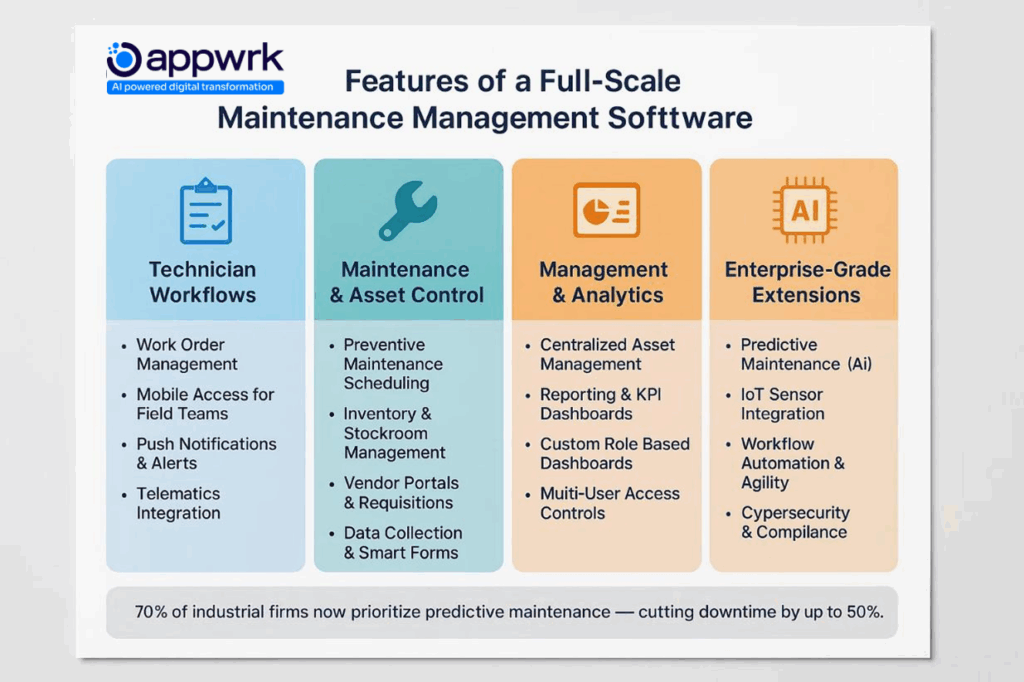
Features of a Full-Scale CMMS Software
A modern CMMS software for maintenance must support daily operations, field execution, and enterprise scalability, all in one interface. Instead of tiering features by plan, here’s how essential capabilities map to actual business functions.
Features for Technician Workflows
Core CMMS Features
Purpose
Work order management
Create, assign, and track tasks in real time.
Mobile CMMS access
Enable field technicians to update task data from remote job sites.
Push notifications
Send instant alerts for assignments, parts requests, or asset breakdowns.
Telematics integration
Track vehicles and mobile assets for better visibility and routing.
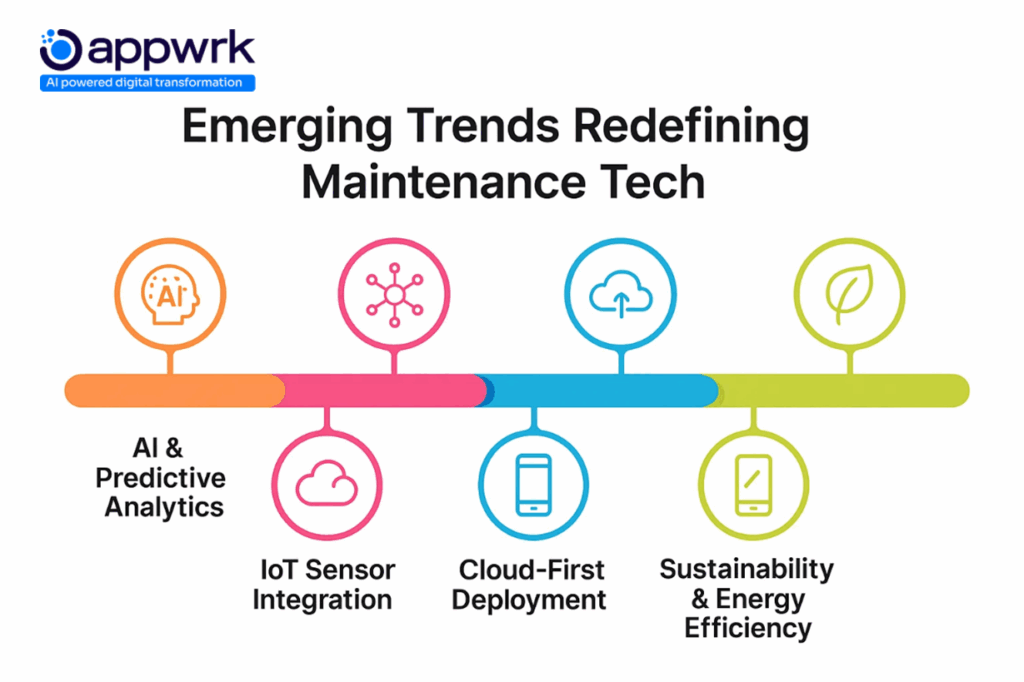
1. AI-Driven Predictive Maintenance CMMS platforms are increasingly using AI to predict equipment failures before they occur, reducing unplanned downtime and extending asset life.
2. IoT and Sensor Integration Real-time monitoring via IoT sensors enables smarter asset management, automated alerts, and condition-based maintenance.
3. Mobile-First & Field Accessibility Mobile CMMS apps empower technicians to update work orders, track assets, and access dashboards on the go, increasing adoption and efficiency.
4. Data Analytics & KPI Dashboards Advanced analytics and visual dashboards provide actionable insights on maintenance efficiency, costs, and asset performance.
5. Sustainability & ESG Tracking Modern CMMS tools track energy, water, and carbon data to support sustainability initiatives and ESG reporting.
6. Cloud & Hybrid Deployment Flexibility Organizations increasingly prefer cloud or hybrid deployments for scalability, secure remote access, and integration with enterprise systems.
Why Build a Custom CMMS (vs Buying Off-the-Shelf)?
With off-the-shelf CMMS platforms now offering plug-and-play features, many mid-sized and enterprise businesses are still shifting toward custom CMMS software development. The reason? Adaptability, ROI, and operational depth are areas where packaged tools often fall short.
Packaged CMMS: Limited Fit, Rising Costs
Feature lock-ins: Adding vendor portals, analytics, or API integrations usually means costly upgrades.
Low data flexibility: Generic CMMS tools often struggle with hybrid environments or custom asset hierarchies.
Workflow friction: Teams bypass tools when they don’t match real-world maintenance routines.
Custom CMMS: High Control, Higher ROI
Aligned workflows: Designed around your exact asset hierarchy, SOPs, and approval loops.
Future-ready architecture: Choose your tech stack, deployment type, and integration depth.
Ownership & cost control: No recurring per-user fees, you own the product, control the roadmap, and scale efficiently.
If your operations span multiple sites, field teams, and IoT-driven assets, a custom CMMS platform isn’t just an upgrade; it’s a necessity for sustainable scalability.
A modern custom CMMS can do more than cut downtime or streamline maintenance; it can generate revenue when built strategically. Here are the most effective monetisation levers businesses are adopting in 2025:
1. Sell Maintenance as a Service (MaaS)
Convert your CMMS into a client-facing maintenance portal if you’re an OEM or facilities provider.
Add branded dashboards, SLA scheduling, and client logins.
Generate recurring revenue through subscription-based service contracts.
2. Turn Data Into a Product
Leverage IoT and asset logs to build predictive analytics models for equipment reliability.
Offer these insights as paid reports or subscription dashboards to vendors or insurers.
3. Use CMMS to Unlock ESG Revenue
Track energy, water, and carbon data to document sustainability performance.
Support ESG-linked certifications and funding opportunities using verifiable real-time metrics.
4. License Internal Tools
Repackage internal modules, such as vendor management or inspection tools, as standalone SaaS products.
License them to niche markets or partners under your brand.
How Much Does It Really Cost to Build a CMMS from Scratch?
While earlier sections covered CMMS pricing by tier and region, this breakdown shows the true cost of building CMMS software from zero, including early decisions, feature iterations, and long-term ownership expenses often missing in vendor quotes.
Pre-Build Planning Costs
Requirements gathering & scoping: $2,000 to $5,000
Platform strategy: Web-only, mobile-first, or hybrid architecture
Compliance planning: For sectors under FDA, HIPAA, or ISO, legal and tech planning can increase early-stage costs significantly
Core Build Phase
MVP with base features: $15,000 to $25,000
Custom modules (inventory, mobile, AI): +$5,000 to $25,000 per module
Integrations (ERP, IoT, finance): +$7,000 to $20,000
Enhancement cycles: Continuous improvements every 6–18 months
The real cost of CMMS software isn’t just about coding; it’s about what you build, how fast you scale, and how aligned the system remains with daily operations.
Bottom Line: Custom CMMS development delivers high control, but only when built around a clear roadmap and the right technology partner.
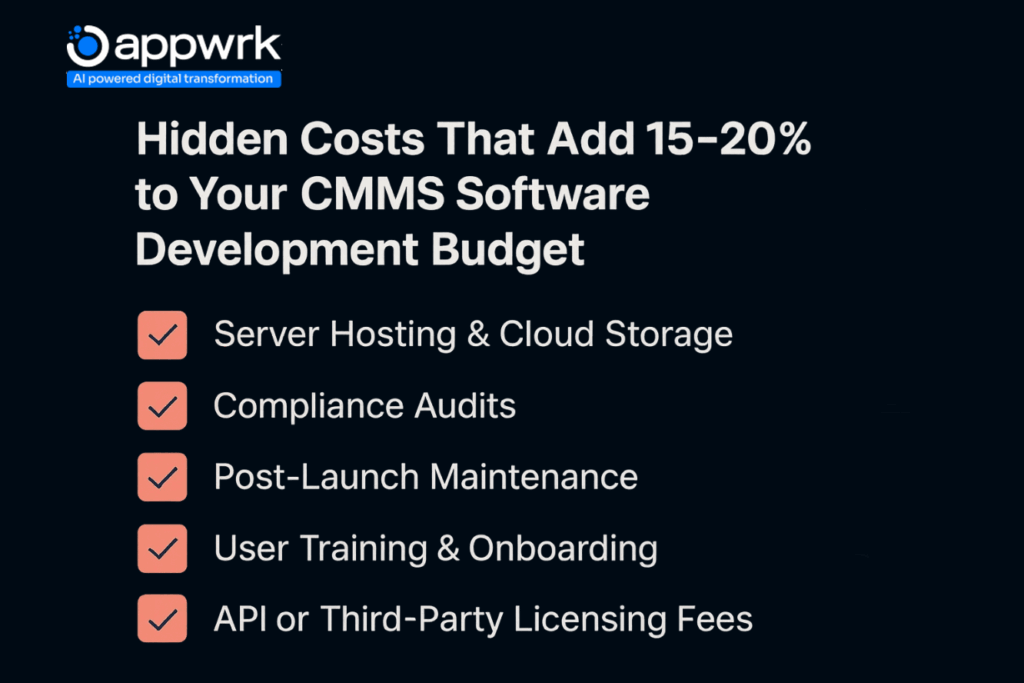
What Are the Hidden Costs That Inflate CMMS Software Budgets?
Even well-scoped CMMS projects often exceed budgets, not from poor execution, but from overlooked cost drivers. These hidden elements can inflate spending by 20–40% if not planned early.
1. Over-Engineering Too Early
Adding excessive modules upfront leads to longer testing and change cycles.
Start with essential CMMS features only, scale once adoption stabilises.
2. Integration Assumptions
ERP, SCADA, and finance integrations often require complex data mapping.
Always document integration logic before finalising your CMMS software cost.
3. User Training & Resistance
Poor onboarding leads to low adoption and higher retraining costs.
Allocate 5–10% of the budget for walkthroughs, documentation, and live sessions.
4. Security & Compliance Gaps
Adding security later costs more than including it upfront.
Plan compliance (ISO, FDA, HIPAA) into both SaaS and on-premise CMMS builds.
Review pricing models carefully, especially when comparing SaaS vs. perpetual licensing.
Conclusion: Hidden costs emerge after go-live, not before. Avoid them through clear scoping, phased onboarding, and early vendor transparency.
How to Build CMMS Software in Phases Without Risking Budget or Functionality
Launching a full CMMS system at once often leads to scope creep, user rejection, or overspending. Leading organisations are adopting phased CMMS development to balance control, feedback, and financial discipline.
Phase 1: MVP Build (Core Operations)
Include essential modules, asset registry, work order management, and basic reporting.
Skip deep integrations; use manual data syncs if needed.
Test with one or two internal teams before scaling.
Phase 2: Add Field & Scale Features
Introduce mobile CMMS access, dashboards, and inventory tracking.
Integrate with ERP, procurement, and accounting systems.
Expand users gradually to ensure adoption consistency.
Phase 3: Optimisation & Advanced Intelligence
Add predictive maintenance, IoT sensors, and custom workflow automation.
Implement compliance tracking and alerts.
Scale logic across multiple sites or business units.
Why It Works:
Reduces upfront investment
Enables rapid feedback and iteration
Keeps features tied to real operational needs
Prevents unnecessary tech bloat
How Appwrk Helped Ayyeka Develop a Predictive Maintenance Platform Using IoT
Ayyeka, a global IoT solutions provider, needed a predictive platform to detect infrastructure issues before failures occurred. Their goal was to turn raw sensor data from thousands of remote field devices into real-time insights, alerts, and visual dashboards, without adding operational complexity for users.
The Challenge
Data overload: Unstructured information from hundreds of remote field assets made anomaly detection difficult.
Slow responsiveness: Legacy systems required manual reviews to identify critical thresholds and failures.
Limited flexibility: Teams couldn’t customise how data streams were visualised or prioritised by use case.
The Solution (By APPWRK)
APPWRK built a modular, CMMS-inspired dashboard designed around predictive intelligence, flexibility, and instant alerting.
Key solution components included:
Threshold-based alerting: Smart triggers that detect anomalies before device failure.
User-controlled dashboards: Customizable layouts showing only the most relevant sensor data per team.
Real-time analytics widgets: Instant visualisation of live readings, eliminating lag in field performance reports.
Condition-based monitoring: Automation reduced manual interventions across asset networks.
The Business Impact
72% faster anomaly detection, leading to major reductions in downtime.
Over 40% fewer unplanned maintenance incidents, improving reliability across IoT infrastructure.
$200,000+ annual savings in field service labour costs through predictive maintenance automation.
The solution evolved into a client-facing platform, now deployed by municipalities and utilities worldwide to track asset health and performance remotely.
Top 10 CMMS Software Tools (With Pricing & Ideal Use Cases)
If you’re not ready to build your own system, here’s a curated comparison of the best CMMS software platforms, based on CMMS pricing models, starting costs, and use-case alignment across industries.
CMMS Software Tool
Starting CMMS Pricing (USD per user/month)
Ideal Use Case / Industry Application of the CMMS software
Public sector, municipalities, and utility infrastructure management
These tools offer a strong foundation, but if you need full control, integrations, or monetisation, custom CMMS software development becomes more cost-efficient over time.
Founder’s Guide to Launching a Maintenance Platform
Building a maintenance management platform takes more than code. It demands clarity of purpose, modular thinking, and tight cost control from day one. Here’s a clear roadmap founders can actually use:
Step 1: Define the Problem, Not Just Features
Start with what’s broken, missed work orders, reactive repairs, or scattered asset data. Don’t list features yet. Define the operational pain you want your CMMS to eliminate.
Step 2: Build an MVP That Tracks, Not Just Reports
Dashboards look great, but action wins. Prioritize modules that reduce downtime, asset logs, task scheduling, and failure alerts, before analytics or design polish.
Step 3: Choose Flexible Infrastructure
Pick tech that scales with your users, not against them. Whether cloud, hybrid, or on-premise, ensure it offers open APIs, no hidden licensing costs, and secure data control.
Step 4: Validate with One Team
Launch with a single site or department. Collect feedback on workflow speed, alert accuracy, and admin effort. Adjust before expanding.
Step 5: Iterate Based on Metrics, Not Hunches
Add features only when your system proves ROI, fewer breakdowns, faster repairs, or lower labour hours. Smart CMMS builds grow with your operations, not ahead of them.
Bottom line: Start lean, learn fast, and scale based on data, not tech trends.
How APPWRK Can Help in Custom Maintenance Software Development
APPWRK builds custom CMMS softwaredesigned around your maintenance workflows, not one-size-fits-all templates. From asset tracking and predictive analytics to full-stack integrations with IoT, ERP, and field service systems, we deliver high-performance platforms that drive measurable returns.
Our approach:
40% faster go-to-market cycles through agile, modular development
Predictive maintenance and workflow automation built for uptime and compliance
UX-driven adoption strategies that increase on-ground usage rates
We don’t just build software. We build operational intelligence.
FAQs
How much does CMMS software cost? Most cloud-based CMMS pricing ranges from $20 to $120+ per user/month, depending on features, hosting, and vendor.
How much does it cost to build CMMS software in India? Custom CMMS development in India averages $25 to $40/hour, with MVP builds between $12,000 and $25,000.
How much does it cost to build a CMS platform? Developing a content management system costs $10,000 to $60,000, depending on complexity and whether it’s open-source or fully custom.
How much will it cost to build maintenance software from scratch? Expect $25,000 to $120,000+, depending on modules, integrations, and infrastructure requirements.
Is there a free version of CMMS software available? Yes, tools like Fiix and Limble CMMS offer free tiers, but most teams outgrow them quickly due to limited customisation.
What is the cost per month for asset maintenance software? Entry plans start around $20–$45 per user/month; enterprise CMMS with IoT and analytics can exceed $100 per user/month.
How does eMaint CMMS pricing compare? eMaint CMMS starts at $69 per user/month (Team plan). Pricing rises with added modules and analytics.
What does Hippo CMMS charge monthly? Hippo CMMS begins around $35 per user/month, though training or integration support may cost extra.
What factors influence CMMS pricing the most? Major cost drivers include user volume, feature complexity, integration depth, and deployment model (cloud vs on-premise).
Gourav Khanna is the Co-founder and CEO of APPWRK, leading the company’s vision to deliver AI-first, scalable digital solutions for enterprises and high-growth startups. With over 16 years of leadership in technology, he is known for driving digital transformation strategies that connect business ambition with outcome-focused execution across healthcare, retail, logistics, and enterprise operations.
Recognized as a strategic industry voice, Gourav brings deep expertise in product strategy, AI adoption, and platform engineering. Through his insights, he helps decision-makers prioritize market traction, operational efficiency, and long-term ROI while building resilient, user-centric digital systems.
Subscribe to APPWRK Blogs, We'll Do the Rest!
Get Blogs on UI/UX, Mobile Apps, Online Marketing, and Web development technology.
Unlock worthy and priceless suggestions from the masters of mobile and web app development